🤖Have you ever tried Chat.M5Stack.com before asking??😎

Subcategories

  • 551 Topics
    2k Posts
    H
    @Danieldsouza I prefer to use KiCAD for schematic and PCB design. The software is open source It runs on Windows, Linux, Mac there is a strong community there is a ton of libraries for thousands of components some part distributor and assembling factories provide their own library or allow symbol and footprint download making your own symbols and footprints is very easy design rule checking I am not an advanced user but managed to make a 4-layer PCB after watching a few tutorial videos. Independend of the EDA Tool make sure you avoid the common tripping hazard like missing blocking caps or unwanted ground loops.
  • When you meet problems using M5Stack, we help you solve it.

    201 Topics
    990 Posts
    S
    不小心下载了一个imu什么的……咔咔一顿后……我关了重新开……,但还是不会动,只会左右动,然后跳舞的话只会亮灯,不会动,只能左右转动……
  • 505 Topics
    2k Posts
    D
    Hopefully I can shed a little light on this topic. The AIN4-20mA unit uses a STM32 processor to handle the I2C interface in software. For some reason, the timing is not wholly compatible with the Raspberry Pi kernel I2C drivers. However, the Espressif I2C implementation is a lot more tolerant and flexible and works just fine. That's why it works with the M5 controllers. There was a an update to the github repo for this unit's firmware (https://github.com/m5stack/M5Module-4-20mA-Internal-FW) which changed the I2C library that was used. It's possible that this will fix it, but I haven't bothered to set up a STM32 development system to try it. If you really want to use a Pi or other Linux host board, you could use any inexpensive ESP device (like an M5Stamp) as a go-between. Another option is to use something like the Arduino UNO Q, which runs Linux on the main processor and allows you to run C++ code on the STM32 microcontroller to talk to I2C devices. It's really better to run real-time control on a separate microcontroller anyway.
  • 1k Topics
    6k Posts
    Y
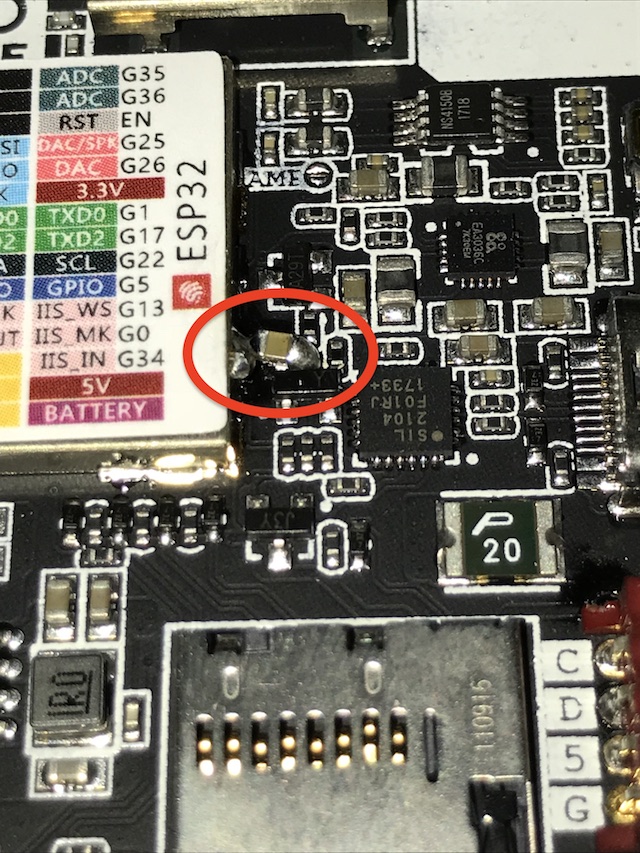
    Root Cause Analysis A detailed schematic review revealed the source of the problem. All three components — Core2, Audio Module, and Bottom2 — are interconnected through the shared M5 BUS. The Bottom2 module includes a SPM1423 MEMS microphone, which uses: GPIO0 (BUS pin 24) for the clock signal (CLK) GPIO34 (BUS pin 26) for the data signal (DAT, digital output) The Audio Module, based on the ES8388 codec, uses: GPIO0 (BUS pin 24) for I2S_MCLK GPIO34 (BUS pin 26) for I2S_MAIN_DIN This creates a fundamental hardware conflict on the I2S bus. The Core Conflict Two independent devices attempt to drive the same data line: The ES8388 (M144 Audio Module) uses GPIO34 to send digitized audio data from its ADC (line-in or microphone) to the ESP32 via I2S. The SPM1423 (Bottom2) uses the same GPIO34 to output PDM audio data from its internal MEMS microphone. From the ESP32’s perspective: GPIO34 is input-only However, on the physical PCB traces, both devices are electrically connected to this same line and actively drive it. This results in a classic and severe bus contention scenario: Two outputs connected together No arbitration No isolation No possibility for coexistence Why This Cannot Be Solved in Software At first glance, one might consider disabling the microphone via software. Unfortunately, this is not feasible due to both architectural and hardware constraints. The Bottom2 doesn’t expose the SPM1423 MEMS dedicated enable/disable (chip select) pin. The only way to silence it — effectively forcing its data output into a high-impedance (Hi-Z) state — is to stop its clock signal on GPIO0. This leads directly to a deadlock: If the M144 switch is set to position A: GPIO0 is used as MCLK (mandatory master clock for ES8388 operation, typically 12.288 MHz) If the switch is set to position B: GPIO0 becomes I2S SCLK (bit clock) Additionally: The internal amplifier of the Core2 (NS4168) also uses GPIO0 for BCLK In other words, GPIO0 is always actively used in any valid configuration. Stopping the clock to disable the microphone would simultaneously break: the ES8388 codec or the Core2 internal audio path Thus, there is no viable way to control the microphone via software without disrupting essential system functionality. Design Oversight The A/B switch on the M144 Audio Module was clearly designed to avoid clock conflicts (MCLK vs SCLK) with other peripherals. However, the design completely overlooks the data line conflict on GPIO34. This is particularly problematic because: the Bottom2 module is an official M5Stack accessory the SPM1423 microphone is always active by default both modules are intended to be used within the same ecosystem Despite this, their coexistence leads to a non-functional configuration when using the ES8388 input path. Conclusion This issue is not a matter of configuration, firmware, or library incompatibility. It is a fundamental hardware design conflict on the shared M5 BUS. When Bottom2 is attached: the SPM1423 microphone continuously drives the I2S data line the ES8388 is unable to deliver valid audio data the result is severe noise and corrupted signal There is no reliable software workaround. The only effective solutions are hardware-level: physically removing or isolating the SPM1423 microphone redesigning the Bottom2 PCB to include a switch or gating mechanism routing the microphone control (e.g., SELECT or enable logic) to a dedicated GPIO Until such changes are implemented, the ES8388 input functionality cannot be used in conjunction with the Bottom2 module in a stable and predictable way. My solution was to remove the SPM1423 Microphone from the PCB. Another solution is to cut the relevant pins from the Bottom2 BUS with the same effect - removing SPM1423 from the circuit.
  • 55 Topics
    203 Posts
    J
    I have been able to get a program to work that uses the M5EchoBase library but no luck using the unified library. For example the simple program below doesn't work. #include <M5Unified.h> void setup() { // 1. Initialize M5Unified delay(1000); // Delay for a moment to allow the system to stabilize. auto cfg = M5.config(); cfg.serial_baudrate = 115200; M5.begin(cfg); // 2. Configure the Speaker for the Atomic Audio Base (ES8311) // We access the speaker configuration directly via M5.Speaker.config() auto spk_cfg = M5.Speaker.config(); // Set pins for Atomic Audio Base (ES8311) spk_cfg.pin_bck = 8; // BCLK spk_cfg.pin_ws = 6; // LRCK (WS) spk_cfg.pin_data_out = 5; // DAC (DOUT) spk_cfg.i2s_port = I2S_NUM_0; // Configure for external codec (not internal DAC) spk_cfg.use_dac = false; spk_cfg.sample_rate = 44100; // Apply the configuration M5.Speaker.config(spk_cfg); // 3. Start the speaker M5.Speaker.begin(); // 4. Set volume (0-255) M5.Speaker.setVolume(128); } void loop() { M5.update(); // Play a 1000 Hz tone for 1000 milliseconds (1 second) M5.Speaker.tone(1000, 1000); // Wait for the tone to finish delay(1000); // Small delay before next loop delay(1000); } Is there no way to set up the ES8311 codec without using M5EchoBase? strangely if I run the program below then load the above program the tone works? But I can't stick the M5.Speaker.tone(1000, 1000); command in the program below and have it work. Does anyone know how to play a tone using only the Unified library from an AtomS3R into a Atomic Audio Base (ES8311 codec)? #include <M5Unified.h> #include <M5EchoBase.h> #if defined(CONFIG_IDF_TARGET_ESP32S3) #define RECORD_SIZE (1024 * 400) #elif defined(CONFIG_IDF_TARGET_ESP32) #define RECORD_SIZE (1024 * 400) #endif #if (ESP_IDF_VERSION >= ESP_IDF_VERSION_VAL(5, 0, 0)) M5EchoBase echobase; #else M5EchoBase echobase(I2S_NUM_0); #endif static uint8_t *buffer = nullptr; // Pointer to hold the audio buffer. void setup() { delay(1000); // Delay for a moment to allow the system to stabilize. auto cfg = M5.config(); cfg.serial_baudrate = 115200; M5.begin(cfg); // Initialize the EchoBase with ATOMS3 pinmap. #if defined(CONFIG_IDF_TARGET_ESP32S3) if (!echobase.init(44100 /*Sample Rate*/, 38 /*I2C SDA*/, 39 /*I2C SCL*/, 7 /*I2S DIN*/, 6 /*I2S WS*/, 5 /*I2S DOUT*/, 8 /*I2S BCK*/, Wire) != 0) { Serial.println("Failed to initialize EchoBase!"); while (true) { delay(1000); } } #elif defined(CONFIG_IDF_TARGET_ESP32) // Initialize the EchoBase with ATOM pinmap. if (!echobase.init(44100 /*Sample Rate*/, 25 /*I2C SDA*/, 21 /*I2C SCL*/, 23 /*I2S DIN*/, 19 /*I2S WS*/, 22 /*I2S DOUT*/, 33 /*I2S BCK*/, Wire) != 0) { Serial.println("Failed to initialize EchoBase!"); while (true) { delay(1000); } } #endif echobase.setSpeakerVolume(80); // Set speaker volume to 70%. echobase.setMicGain(ES8311_MIC_GAIN_0DB); // Set microphone gain to 0dB. buffer = (uint8_t *)malloc(RECORD_SIZE); // Allocate memory for the record buffer. // Check if memory allocation was successful. if (buffer == nullptr) { // If memory allocation fails, enter an infinite loop. while (true) { Serial.println("Failed to allocate memory :("); delay(1000); } } Serial.println("EchoBase ready, start recording and playing!"); // M5.Speaker.tone(2000, 2000); // delay(2000); } void loop() { Serial.println("Start recording..."); // Recording echobase.setMute(false); echobase.record(buffer, RECORD_SIZE); // Record audio into buffer. delay(100); Serial.println("Start playing..."); // Playing echobase.setMute(false); delay(10); echobase.play(buffer, RECORD_SIZE); // Play audio from buffer. //M5.Speaker.playRaw(buffer, RECORD_SIZE, 44100, false, 1, 0); delay(100); }
  • For topics on the M5Stack Atom.

    260 Topics
    849 Posts
    K
    After a lot of testing and searching it became apparent that the M5Atom controller did not work properly (never had this type of problem before). This, outdated software and some wrong suggestions by both ChatGPT and the AI bot from M5Stack (with the knowledge base available) made it a bit of struggle. However, after all updates and testing different hardware it finally works again. So thanks to anyone that spent time on this!
  • M5Stack with CAN

    14
    0 Votes
    14 Posts
    48k Views
    J
    Another getting this for a CAN idea, after using CAN on other ESP32 modules. I am going to see if I can squeeze an SN65HVD230 board inside the enclosure and run without a battery.
  • This topic is deleted!

    1
    0 Votes
    1 Posts
    3 Views
    No one has replied
  • Suggestions for future releases.

    14
    1 Votes
    14 Posts
    42k Views
    m5stackM
    thanks for suggestions
  • Replacement parts

    2
    0 Votes
    2 Posts
    6k Views
    JJJ
    @chris1101 Hi Chris, haven't seen any other reports of this..... I've used quite a few M5's without any button problems. Some parts are referenced on the last page of the info sheet included with the M5 - but not the buttons. Don't think there is another list referencing parts. In terms of a fix: Presumably the M5 powers on when connected to USB. So I'm assuming you sometimes need the on/off/reset button to operate as the reset button when you are uploading code. And naturally you need the button to power on the M5 when dis-connected from USB. Is that right? Connecting a capacitor between the RST and GND ports should solve both these problems. Connect negative to ground , positive to RST. When NOT connected to USB, connecting the cap should power it up (can remove cap once started**). Also when uploading code, leaving it connected should allow code to load - or if use of the reset button is needed when uploading, just disconnect and re-connect the cap. Or - connect a button along with the cap. The cap I use is a 22 uf through-hole cap with polarity. 10 uf max has been suggested as the ideal max - but I've had no problems. Further discussion re. which cap to use: http://forum.m5stack.com/topic/113/an-even-simpler-fix-when-upload-fails http://forum.m5stack.com/topic/55/simple-fix-when-upload-fails/24 ** Turning it off could still be a problem.
  • Additional analog inputs

    1
    0 Votes
    1 Posts
    5k Views
    No one has replied
  • Manufacturing defect?

    4
    1
    0 Votes
    4 Posts
    10k Views
    JJJ
    @world101 Hi World101, Just to clarify, I was saying the one you have is "not the most recent model with 4Mb PS-RAM and MPU-9250" - emphasis on the AND. So your model does have the MPU9250 - but it does not have the 4 Mb PS-RAM. At this time - Feb 2018 - all models in grey cases include the MPU9250. The models in black and white cases do not include MPU9250. The model in the grey case that includes the 4 Mb PS-RAM features a different chip (SoC) that is much smaller and does not have a sticker on the back showing the GPIO ports. Check the photo comparison. The photo on the left does show a black case model but the chip is the same as in yours - as you can see. Thanks for clarifying the issue you had and multiple kudos to you for following up your earlier posts and noting how you fixed things. Good operator! [image: 1518981212388-m5stack-models-resized.jpg]
  • M5stack original firmware (binary)

    5
    0 Votes
    5 Posts
    27k Views
    world101W
    I also flashed mine with micropython. To get it back to the factory program that came installed, I connected it to the Arduino IDE, selected Tools > Board: M5Stack-Core-ESP32. Next I opened: File > Examples > M5Stack > Basics > FactoryTest. Upload that to the m5stack and you should be back to the factory program. If you don't have the M5Stack custom libraries, you can install it from Sketch > Include Library > Manage Libraries... Type m5stack in the filter box, select the result, and install the latest version.
  • Hardware suggestions for next version of products

    3
    1 Votes
    3 Posts
    9k Views
    m5stackM
    yes, i will change the design. thank you!
  • How to test we compile a M5Stack ?

    3
    0 Votes
    3 Posts
    10k Views
    reaper7R
    try: #ifdef ARDUINO_M5Stack-Core-ESP32 as is declared in arduino boards: https://github.com/espressif/arduino-esp32/blob/master/boards.txt#L1169 but this is temporary solution because hyphens are not valid for arduino. We waiting for some changes... "issue" is added: https://github.com/m5stack/M5Stack/issues/41
  • Newest M5Stack with 4MB psRAM

    2
    0 Votes
    2 Posts
    8k Views
    JJJ
    @pkourany Hi, You don't need to enable the PSRAM to run standard sketches in the Arduino IDE. The Arduino IDE does not act on a low enough level for it to write directly to the PSRAM... you have to use something else like the ESP Flash Download Tool, which is used for example when you load Micro Python onto the M5Stack. Or the ESP-IDF compiler / flashing program.... Both are discussed here: http://iot-bits.com/esp32/esp32-flash-download-tool-tutorial/ The ESP Flash Download Tool is easier to setup and use than the ESP-IDF compiler / flashing program.
  • Interupt pin for build-in MPU9250

    2
    0 Votes
    2 Posts
    5k Views
    m5stackM
    i am sorry that no interupt pin for mpu9250, just link the sda and scl. there are no enough pins from esp32
  • M5Stack and esp-idf

    2
    0 Votes
    2 Posts
    10k Views
    loborisL
    @lim All ESP32 applications running on any ESP32 board, including M5Stack are built using esp-idf. esp-idf is not FreeRTOS. FreeRTOS is included into esp-idf (as a component) and is slightly modified version of the official FreeRTOS (see esp-idf documentation). The mentioned drivers are not the part of the esp-idf, but are built on-top of esp-idf and uses the esp-idf API.
  • Board header pin part numbers

    4
    0 Votes
    4 Posts
    13k Views
    JJJ
    @zazar Ah yes - sorry - forgot about that note ..... that is right. Perhaps you could order a battery module ? They are handy to have.
  • problem with m5stack (with mpu9250)

    5
    0 Votes
    5 Posts
    15k Views
    JJJ
    @suslikman I am using M5Stack with Windows 10 - 64 bit on 3 different systems and M5Stack works fine on all. No issues. On one machine originally the drivers did not install correctly - though it wasn't obvious at the time. To check driver installation worked correctly: Dis-connect M5Stack from PC if connected. Turn up PC volume. Open device manager. Connect M5Stack using USB cable.... once M5Stack is connected, you should hear a Windows sound - "bing""- and now in the device manager a new item should magically appear called "Ports” Click on it – it should show the Silicon Labs driver listed. If not , you need to re-install the driver - make sure Python is on your Windows path. You can verify the path is working by opening command prompt and typing - python. Are these files (below) available after you have Python installed and after you run get.exe ? They should be. [image: 1517497917998-b38be06f-ed2b-41d4-8a75-15e3897fa55b-image-resized.png]
  • M5Stack with psRAM flash size

    4
    0 Votes
    4 Posts
    13k Views
    m5stackM
    u can order by jimmyLai@m5STack.com. the same price of the psram for u, PayPal is both okay, and the Gpio16/17 are used by PSRAM, so it is not available to use the serial2 when psram is running.
  • Stack is dead :(

    10
    0 Votes
    10 Posts
    29k Views
    S
    @snmcma 在 Stack is dead :( 中说: @m5stack 在 Stack is dead :( 中说: you mean Arduino? Yes, Arduino can throw off the firmware file for overwriting in m5? and a screenshot how to write down you can throw off all the firmware files with the instruction how to return to the initial state, micropyton does not suit me. I reprogrammed it as an esp32 dev module, unfortunately in m5stack mode it is not programmed
  • Sim800l module

    4
    0 Votes
    4 Posts
    12k Views
    m5stackM
    no serial1, m5stack offer serial0 and serial2
  • This topic is deleted!

    1
    0 Votes
    1 Posts
    2 Views
    No one has replied
  • Simple fix when upload fails.

    6
    1
    3 Votes
    6 Posts
    20k Views
    M
    If you do not have a capacitor available, you can also try to set the "Upload Speed" to 115200 in Arduino IDE. Of course the uploads are longer, but it did the job for me : i did not have any upload error since I also installed the latest CP210x Windows driver (v10.1.1 for Windows 10) but i don't think this is necessary
  • Schematics

    3
    0 Votes
    3 Posts
    13k Views
    A
    Can you convert the pcbdoc to version 5 (so it is compatible with EasyEDA) or to another more open format. Few of us have Altium