šŸ¤–Have you ever tried Chat.M5Stack.com before asking??šŸ˜Ž
  • UIFlow2.X Alpha 17 online.

    Pinned
    9
    2 Votes
    9 Posts
    19k Views
    ajb2k3A
    There haven't been any official but if you check the update log of UIFlow 2.0.1 you can find the changes.
  • Flow.m5stack.com downtime please read!!!!

    Pinned
    9
    4 Votes
    9 Posts
    16k Views
    KhanFromNorthK
    You can continue developing on the M5Stack Core2 reliably. The key is to bypass UIFlow entirely and use MicroPython directly through Thonny or VS Code.
  • 2 Votes
    44 Posts
    264k Views
    P
    I'm on Mac OS 12.2.1, and I'm running into the problem listed in this topic. Changing baud rate to 460800 Changed. Configuring flash size... A fatal error occurred: Timed out waiting for packet header *** [upload] Error 2 ============================================= [FAILED] Took 4.46 seconds ============================================= The terminal process "platformio 'run', '--target', 'upload'" terminated with exit code: 1. When using the supplied firmware update tool, I'm getting following error: Detecting M5Stack products. Find M5Stack products. Kernel driver deteched. Apply magic success. Fail to cast magic stage 2, please contact vendor. Waiting for device in DFU mode..................... Saving session... ...copying shared history... ...saving history...truncating history files... ...completed. [Process completed] Any suggestions would be appreciated. Thank you!
  • Firmware writing Issues with Windows and linux using the S3 Series.

    3
    4 Votes
    3 Posts
    5k Views
    marryjoseph22M
    Thanks for sharing your findings—this is really useful information, especially for anyone working with ESP32-S3 devices. The distinction between the two drivers (JTAG/Serial and the low-level modem driver) explains a lot of the issues people run into when trying to reflash firmware. It sounds like the main challenge is getting proper access to Bootloader mode when the second driver isn’t installed correctly. On Windows and Linux, driver installation can sometimes be tricky depending on permissions or conflicting drivers. It might be worth checking if the correct USB CDC/ACM or WinUSB drivers are being assigned, or trying tools like Zadig on Windows to manually bind the device to the right driver. Also, holding the BOOT button while connecting (or resetting) the device can sometimes force it into Bootloader mode if it’s not entering automatically. Good call on warning users about Flipper/Marauder firmware—getting locked out of reflashing can be a real headache. Hopefully, with more testing, a consistent driver setup for Windows/Linux can be identified. Looking forward to any updates you find!
  • M5Stack Discord Channel.

    18
    1 Votes
    18 Posts
    40k Views
    P
    I have my cardputer connected to wins11. I have a project loaded in UIflow2.0 and when I press upload to device I get a Log in screen. In m5burner view in Opera browser I get a terminal window and eventually there are messages. I am trying the RTC clock.
  • UIFlow 1.8.4

    5
    1 Votes
    5 Posts
    17k Views
    S
    @Mati said in UIFlow 1.8.4: @m5stack said in UIFlow 1.8.4: We are very sorry, we are working hard to supplement the support of related modules thx for reply, maybe all will be happy if we can see some roadmap with HW implementation. ā€œGood point, Mati. A roadmap would definitely help everyone plan projects better. I’m also waiting on Zigbee support!ā€
  • PSA: Core 2 not powering off.

    2
    0 Votes
    2 Posts
    5k Views
    S
    @ajb2k3 said in PSA: Core 2 not powering off.: You may notice that sometimes the Core2 device may not power off when the button is held in for five seconds. I have noticed that the Button used for power is prone to breaking (I have already notified M5Stack about this issue on multiple occasions) You can replace the switch, but a simpler fix is to use the "battery paper trick" and stick a small block of insulated substance on top of the switch to hold the cover down. I haven't included pictures as the switch is so small and difficult to photograph. P.S. This doesn't just affect Core2 devices, and any device that uses this switch may suffer. Thank you for taking the Time treadad. Adam Bryant Forum Admin Team and Unofficial documentation and guide creator. UIFlow, so easy an adult can learn it! If I don't know it, be patient! I've either not learned it or am too drunk to remember it! Author of the WIP UIFlow Handbook! M5Black, Go, Stick, Core2, and so much more, it can't fit in here! Thanks for the heads-up, Adam. I’ve run into the same issue a couple of times and thought it was just me not holding the button long enough. Good to know it might be a hardware fault. I’ll give the battery paper trick a try and see if that helps. Appreciate you sharing the workaround and letting M5Stack know, hopefully they address it in future batches.
  • Upload M5StickC Schematic

    9
    0 Votes
    9 Posts
    14k Views
    J
    @ajb2k3 thanks for confirming. It not so clear from the provided schematic. Do you know which pin on the AXP is providing boosted 5V? If I had to guess, I would say it is 'IPSOUT' but it is not so clear to me from the Schematic nor the AXP datasheet. Do you know the part number of the IC noted 'DCDC' in screenshot below? [image: 1722940828399-screenshot-from-2024-08-06-12-43-37.png] Thanks
  • UIFlow 1.7.4

    18
    0 Votes
    18 Posts
    37k Views
    C
    @m5stack Happening again (similar) in 1.12.2 In this case the only log message is: >>> reconnect start ... Device looks hanged at thar moment, not executing and not responsive.
  • UIFlow 1.7.8

    12
    2 Votes
    12 Posts
    26k Views
    G
    @uktechguy I can confirm that M5StickC has no receive, only IR Infrared transmit A workaround, if you have a line follower (HW-006) or similar you can use a Grove2Dupont cable to connect the sensor to the M5StickC but (V. IMPORTANT!!!) swap the 5V input to the sensor with jumper cable to the 3V3 of the hat connector on the stick. This will allow a quick test of the receive block associated with the M5Stack IR module block in UIFlow. What I discovered is that the standard transmit block (under Hardware > IR). Only accepts one byte for data and one byte for address. According to the NEC standard (not extended) the first 8 bits are the address and 17-24 bits are the command (NB 'data' is a bit of a loose term, it would be better as 'command' in the UIFlow block, datagram or 'data' to mean the assembled code). Next gotcha, the bits need to be reversed to use with external equipment, note reversed not inversed. Tool for this: https://www.browserling.com/tools/reverse-binary And this tool to swap between binary and hex https://www.rapidtables.com/convert/number/binary-to-hex.html An example: The code I wanted to send: 0x00F7B04F --> the first byte is not the inverse binary of the second, so it is NEC extended and, so far as I can tell, is unsupported in UIFlow - ideally this needs fixed or second block added! 2nd attempt to use IR to turn on/off LG TV with book code: 0x20DF10EF Logically, I took 20 to be the address and 10 to be the command ('data' in UIFlow block). Sadly, it wasn't. To make this work the addr and data values need to be reversed therefore 20 --> 0x04 and 10 --> 0x08. Hence, I made the UIFlow block: IR(NEC) send addr 0x04 data 0x08 (alt Python ir.tx(0x04, 0x08)). Triggered from button on Atom this worked on my LG tvs. Interestingly, send and receive between Atom and M5StickC didn't reverse the bits. So, I would assume the same would happen if using the receive to scan from a remote. A couple of other examples: https://flow.m5stack.com/?examples=ir_nec_sender_demo https://flow.m5stack.com/?examples=ir_nec_receiver_demo Some other useful references: https://github.com/esikora/ESP32App_Led_IR/blob/PlatformIO/src/ESP32App_Led_IR.cpp https://exploreembedded.com/wiki/NEC_IR_Remote_Control_Interface_with_8051 https://www.sbprojects.net/knowledge/ir/nec.php https://qiita.com/poruruba/items/34220a4dd6aaf48392aa https://docs.m5stack.com/en/unit/ir https://shop.m5stack.com/products/stick-c

  • [UIFLOW] Core2 I2C Conflict with ENV sensors.

    1
    0 Votes
    1 Posts
    4k Views
    No one has replied
  • UIFlow 2.0.1 firmware preview version

    Locked
    7
    1 Votes
    7 Posts
    18k Views
    IAMLIUBOI
    THIS TOPIC WAS ABANDONED. Please check this new topic and discuss怂
  • UIFlow 2.0.0 firmware preview version

    Locked
    34
    2 Votes
    34 Posts
    113k Views
    IAMLIUBOI
    THIS TOPIC WAS ABANDONED. Please check this new topic and discuss怂
  • UIFlow 2.0.2 firmware preview version

    Locked
    14
    1 Votes
    14 Posts
    32k Views
    IAMLIUBOI
    THIS TOPIC WAS ABANDONED. Please check this new topic and discuss怂
  • MAC OSX Users (none Intel)

    3
    1 Votes
    3 Posts
    6k Views
    ajb2k3A
    @teastain yeh, its happened several times now.
  • UIFlow V1.9.9

    4
    1
    2 Votes
    4 Posts
    12k Views
    M
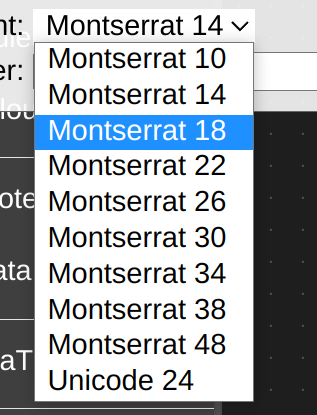
    It shows Montserrat 10 in Uiflow, but when trying to use it in Micro Python getting an error: NameError: name 'FONT_MONT_10' isn't defined
  • UIFlow 1.9.8

    8
    0 Votes
    8 Posts
    17k Views
    A
    @ajb2k3 Kind of. I am using push of data in a time-based function (UIFlow). Tried normal and async save methods of a string and an integer. The Atom then freezes without transmission and the function is never terminated. Previous Firmware 1.9.7 allows continuous transfers of two values and reverts to the main loop after finishing the function.
  • UIFlow 1.9.7

    6
    1 Votes
    6 Posts
    14k Views
    felmueF
    Hi guys in UiFlow the IoTBaseCatM module can only be used if a SIM card has been inserted. In other words the non IoT related ports (e.g. Modbus) cannot be used w/o SIM card inserted. The reason for that is that as part of the initialization catmiot = module.get(module.CATMIOT) an AT+CPIN? command is sent every 6 seconds forever since w/o SIM card inserted the response from the SIM7080 is ERROR. Thanks Felix
  • UIFlow 1.9.6

    11
    1 Votes
    11 Posts
    21k Views
    K
    Just for completeness, I'm on a 2021 Macbook Pro M1Max with 64 GB of RAM and macOS Monterey 12.3.1. I've tried it using Python 3.9.11 and 3.10.3
  • UIFlow 1.9.4

    1
    -1 Votes
    1 Posts
    6k Views
    No one has replied