Possible Bug On Image Hide/Show
-
Core2Duo
Firmware : UiFlow 1.7.4.1-Core2
IDE : UiFlow 1.7.4What I'm trying to do :
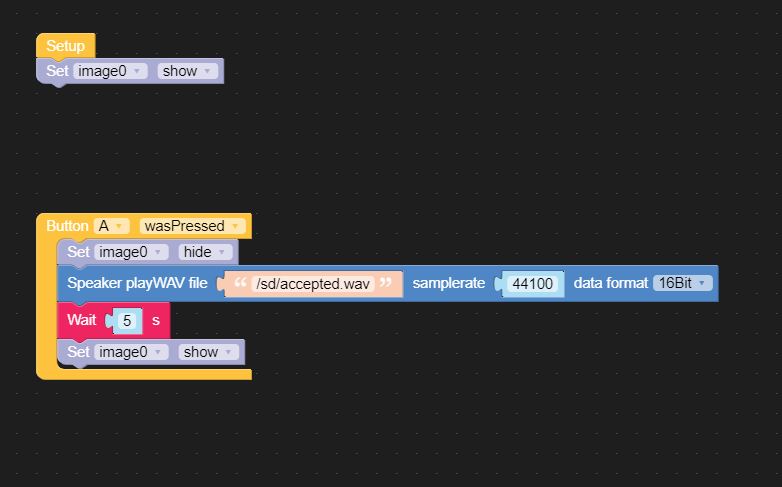
- Display image 0 ( PNG , in Flash , 330 x 240 36.4 KB )
- Wait for Button A to be pressed
- Hide Image 0
- Play WAV file ( SD card )
- Show Label0
- Wait 5
- Show Image 0
What happens :
Everything works, with the exception of the image show/hide/show. It constantly shows after button A is pressed. Wave file pays, but no change to the image.Coded in Blockly,
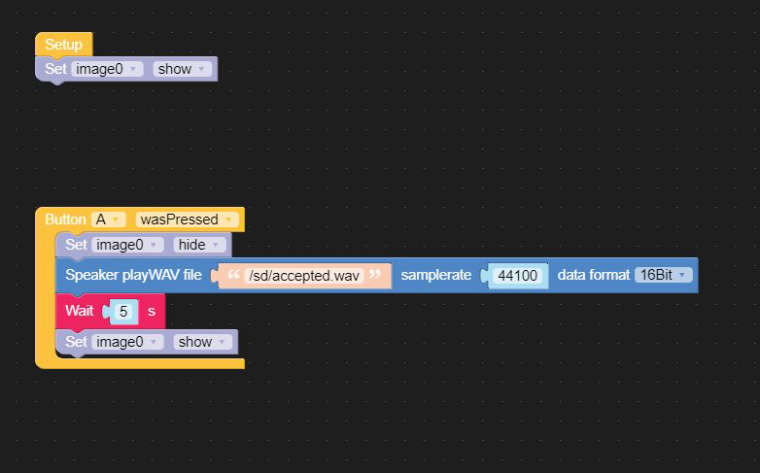
Python :
from m5stack import * from m5stack_ui import * from uiflow import * import time screen = M5Screen() screen.clean_screen() screen.set_screen_bg_color(0xFFFFFF) image0 = M5Img("res/Untitled-2.png", x=0, y=0, parent=None) def buttonA_wasPressed(): # global params image0.set_hidden(True) speaker.playWAV('/sd/accepted.wav', rate=44100, dataf=speaker.F16B) wait(5) image0.set_hidden(False) pass btnA.wasPressed(buttonA_wasPressed) image0.set_hidden(False) -
@delchi said in Possible Bug On Image Hide/Show:
Core2Duo
Firmware : UiFlow 1.7.4.1-Core2
IDE : UiFlow 1.7.4What I'm trying to do :
- Display image 0 ( PNG , in Flash , 330 x 240 36.4 KB )
- Wait for Button A to be pressed
- Hide Image 0
- Play WAV file ( SD card )
- Show Label0
- Wait 5
- Show Image 0
What happens :
Everything works, with the exception of the image show/hide/show. It constantly shows after button A is pressed. Wave file pays, but no change to the image.Coded in Blockly,
Python :
from m5stack import *
from m5stack_ui import *
from uiflow import *
import time

screen = M5Screen()
screen.clean_screen()
screen.set_screen_bg_color(0xFFFFFF)

image0 = M5Img("res/Untitled-2.png", x=0, y=0, parent=None)

def buttonA_wasPressed():
  # global params
  image0.set_hidden(True)
  speaker.playWAV('/sd/accepted.wav', rate=44100, dataf=speaker.F16B)
  wait(5)
  image0.set_hidden(False)
  pass
btnA.wasPressed(buttonA_wasPressed)

image0.set_hidden(False)
Bump ?
Hello! It looks like you're interested in this conversation, but you don't have an account yet.
Getting fed up of having to scroll through the same posts each visit? When you register for an account, you'll always come back to exactly where you were before, and choose to be notified of new replies (either via email, or push notification). You'll also be able to save bookmarks and upvote posts to show your appreciation to other community members.
With your input, this post could be even better 💗
Register Login