Connect DS18B20 to Grove Port A?
-
Hi,
has anyone been able to connect a 1 wire ds18b20 waterproof temperature sensor to the m5stack grove connector A?
I see a + and a - port, and an SDA and an SCL port. Can either of those be used to one wire connections? And how would I do that in code?Thank you so much!
Christian
-
I made custom block for uiflow for do this. But i implemented use only one sensor per gpio pin without checking crc errors (shorter and simplicity code).
https://github.com/stonatm/UiFlow-custom-blocks/tree/master/ds18b20
and here is python code used in this custom block:
https://github.com/stonatm/M5Atom_matrix_library/blob/master/lib/dallas.py
Try connect sensor to SDA pin in groove port, but you must find a number of gpio pin assigned for this line.
You also should connect a pullup resistor (2-10kohm) betwen sensor DQ pin and sensor Vcc. In my case i use ds18b20 without this resistor, but my connection to sensor is shorter than 10cm. -
I've connected a DS1820 waterproof sensor to the Grove / Port A of the M5basic
GND=black
VCC=red
SDA=yellowMy code is :
#include <M5Stack.h>
#include <OneWire.h>
#include <DallasTemperature.h>#define ONE_WIRE_BUS XX
OneWire oneWire(ONE_WIRE_BUS);
DallasTemperature sensors(&oneWire);void setup(){
M5.begin();
M5.Power.begin();M5.Lcd.print("onewire temp test");
}void loop() {
sensors.requestTemperatures();
String text = String(sensors.getTempCByIndex(0),2)+"C";
M5.Lcd.println(text);
delay(800);
M5.Lcd.println("test");
}for XX, I've tried port 21,22,32,33 and a few other I read rumours about. No success to read the temperature so far. Any clue?
-
All right, to answer my own post :
This post helped a lot :
https://community.m5stack.com/topic/1086/problem-when-connecting-more-than-3-ds18b20-temperature-sensors-solved/6And XX is 21.
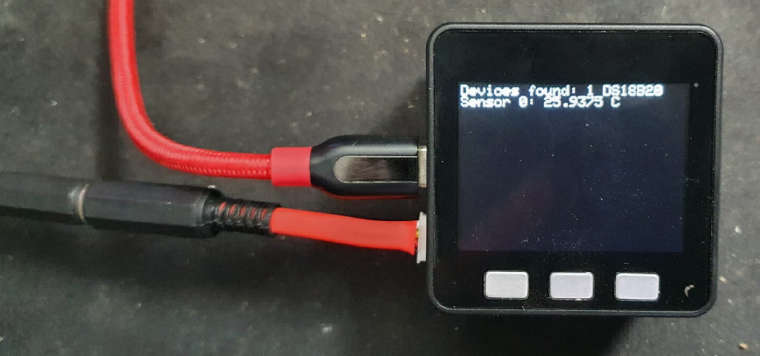
-
I am happy to read that the post was helpful.
Which changes did you apply to make it work?

Hello! It looks like you're interested in this conversation, but you don't have an account yet.
Getting fed up of having to scroll through the same posts each visit? When you register for an account, you'll always come back to exactly where you were before, and choose to be notified of new replies (either via email, or push notification). You'll also be able to save bookmarks and upvote posts to show your appreciation to other community members.
With your input, this post could be even better 💗
Register Login