M5Stack Gauges for Boats
-
Hello,
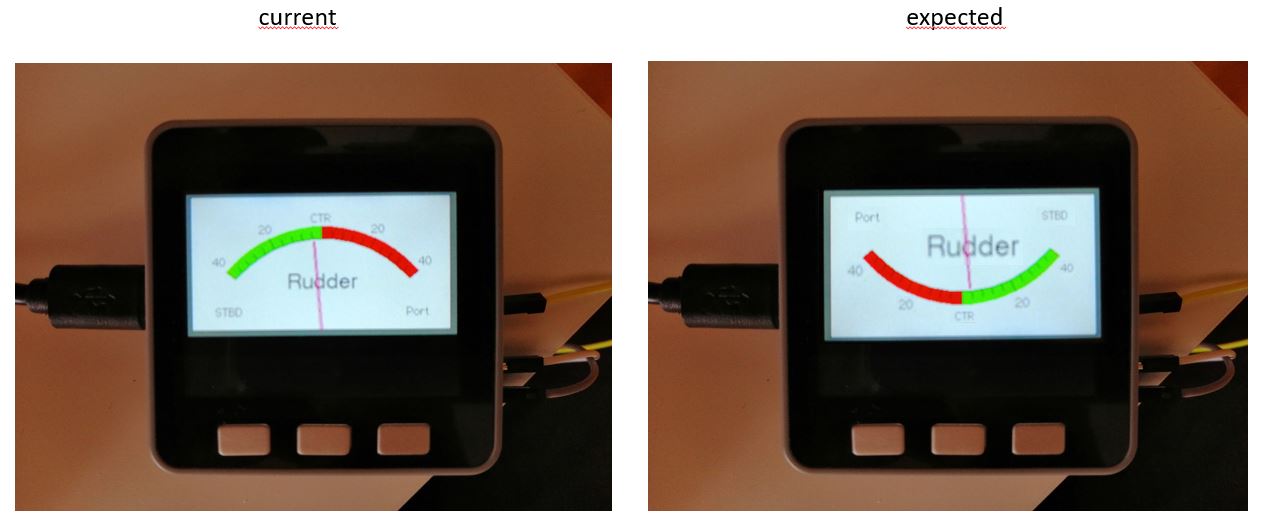
this is my first post in this forum. I am pretty new to this product and not very experienced in Arduino programing. So I need your help in order to finalize my project. I do need several gauges for my boat. So I decided to try the M5Stack which allows me to display 3 different gauges on one display by simply pressing one of the three buttons. As a start I used the example "TFT_Meter_linear". So far the functionality is given. However, I would like to rotate the scale and the pointer. The command "tft.setRotation()" doesn't do it. I would appreciate if someone could give me a hint on which values I have to manipulate in order to get the desired result. I have attached a picture of the current and the required display as well as the code
Best regards
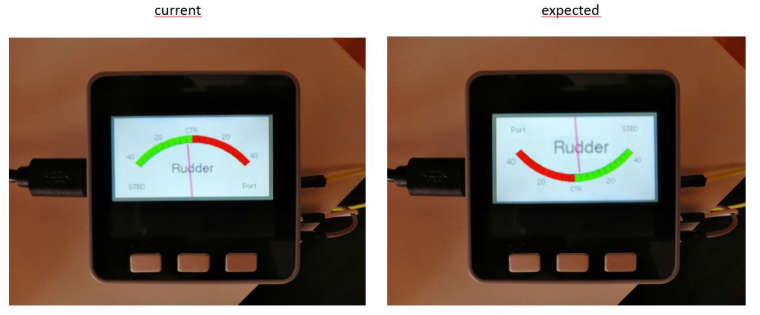 image url)
An example analogue meter using a ILI9341 TFT LCD screen Needs Font 2 (also Font 4 if using large scale label) Make sure all the display driver and pin comnenctions are correct by editting the User_Setup.h file in the TFT_eSPI library folder. ######################################################################### ###### DON'T FORGET TO UPDATE THE User_Setup.h FILE IN THE LIBRARY ###### ######################################################################### Updated by Bodmer for variable meter size */ // Define meter size as 1 for M5.Lcd.rotation(0) or 1.3333 for M5.Lcd.rotation(1) #define M_SIZE 1.3333 #include <M5Stack.h> #define ADC_Calibration_Value1 250.0 // For resistor measure 5 Volt and 180 Ohm equals 100% plus 1K resistor. #define ADCpin1 35 // Potentiometer is connected to GPIO 35 (Analog ADC1_CH7) // add a 1k Resistor from pin 35 to +5V and a Diode from GND to pin 35 (Cathode) // a 10µf cap from GND to pin 35 may reduce a noisy needle #define TFT_GREY 0x5AEB float ltx = 0; // Saved x coord of bottom of needle uint16_t osx = M_SIZE*120, osy = M_SIZE*120; // Saved x & y coords uint32_t updateTime = 0; // time for next update int old_analog = -999; // Value last displayed int value[6] = {0, 0, 0, 0, 0, 0}; int old_value[6] = { -1, -1, -1, -1, -1, -1}; int d = 0; // variable for storing the potentiometer value int potValue = 0; void setup(void) { M5.begin(); M5.Power.begin(); // M5.Lcd.setRotation(1); // Serial.begin(57600); // For debug M5.Lcd.fillScreen(TFT_BLACK); analogMeter(); // Draw analogue meter updateTime = millis(); // Next update time } //***************************************************************************** // ReadADC is used to improve the linearity of the ESP32 ADC see: https://github.com/G6EJD/ESP32-ADC-Accuracy-Improvement-function double ReadADC(byte pin) { double reading = analogRead(pin); // Reference voltage is 3v3 so maximum reading is 3v3 = 4095 in range 0 to 4095 if (reading < 1 || reading > 4095) return 0; // return -0.000000000009824 * pow(reading,3) + 0.000000016557283 * pow(reading,2) + 0.000854596860691 * reading + 0.065440348345433; return (-0.000000000000016 * pow(reading, 4) + 0.000000000118171 * pow(reading, 3) - 0.000000301211691 * pow(reading, 2) + 0.001109019271794 * reading + 0.034143524634089) * 1000; } // Added an improved polynomial, use either, comment out as required void loop() { potValue = ReadADC(ADCpin1) * ADC_Calibration_Value1 / 4096; Serial.print(ReadADC(ADCpin1)); // print raw value Serial.print(" "); // tab Serial.println(potValue); // print final value delay(200); // to smoothen the pointer plotNeedle(potValue, 0); } // ######################################################################### // Draw the analogue meter on the screen // ######################################################################### void analogMeter() { // Meter outline M5.Lcd.fillRect(0, 0, M_SIZE*239, M_SIZE*126, TFT_GREY); M5.Lcd.fillRect(5, 3, M_SIZE*230, M_SIZE*119, TFT_WHITE); M5.Lcd.setTextColor(TFT_BLACK); // Text colour // Draw ticks every 5 degrees from -50 to +50 degrees (100 deg. FSD swing) for (int i = -50; i < 51; i += 5) { // Long scale tick length int tl = 15; // Coodinates of tick to draw float sx = cos((i - 90) * 0.0174532925); float sy = sin((i - 90) * 0.0174532925); uint16_t x0 = sx * (M_SIZE*100 + tl) + M_SIZE*120; uint16_t y0 = sy * (M_SIZE*100 + tl) + M_SIZE*140; uint16_t x1 = sx * M_SIZE*100 + M_SIZE*120; uint16_t y1 = sy * M_SIZE*100 + M_SIZE*140; // Coordinates of next tick for zone fill float sx2 = cos((i + 5 - 90) * 0.0174532925); float sy2 = sin((i + 5 - 90) * 0.0174532925); int x2 = sx2 * (M_SIZE*100 + tl) + M_SIZE*120; int y2 = sy2 * (M_SIZE*100 + tl) + M_SIZE*140; int x3 = sx2 * M_SIZE*100 + M_SIZE*120; int y3 = sy2 * M_SIZE*100 + M_SIZE*140; // Green zone limits if (i >= -50 && i < 0) { M5.Lcd.fillTriangle(x0, y0, x1, y1, x2, y2, TFT_GREEN); M5.Lcd.fillTriangle(x1, y1, x2, y2, x3, y3, TFT_GREEN); } // Red zone limits if (i >= 0 && i <50) { M5.Lcd.fillTriangle(x0, y0, x1, y1, x2, y2, TFT_RED); M5.Lcd.fillTriangle(x1, y1, x2, y2, x3, y3, TFT_RED); } // Short scale tick length if (i % 25 != 0) tl = 8; // Recalculate coords incase tick lenght changed x0 = sx * (M_SIZE*100 + tl) + M_SIZE*120; y0 = sy * (M_SIZE*100 + tl) + M_SIZE*140; x1 = sx * M_SIZE*100 + M_SIZE*120; y1 = sy * M_SIZE*100 + M_SIZE*140; // Draw tick M5.Lcd.drawLine(x0, y0, x1, y1, TFT_BLACK); // Check if labels should be drawn, with position tweaks if (i % 25 == 0) { // Calculate label positions x0 = sx * (M_SIZE*100 + tl + 10) + M_SIZE*120; y0 = sy * (M_SIZE*100 + tl + 10) + M_SIZE*140; switch (i / 25) { case -2: M5.Lcd.drawCentreString("40", x0, y0 - 12, 2); break; case -1: M5.Lcd.drawCentreString("20", x0, y0 - 9, 2); break; case 0: M5.Lcd.drawCentreString("CTR", x0, y0 - 7, 2); break; case 1: M5.Lcd.drawCentreString("20", x0, y0 - 9, 2); break; case 2: M5.Lcd.drawCentreString("40", x0, y0 - 12, 2); break; } } // Now draw the arc of the scale sx = cos((i + 5 - 90) * 0.0174532925); sy = sin((i + 5 - 90) * 0.0174532925); x0 = sx * M_SIZE*100 + M_SIZE*120; y0 = sy * M_SIZE*100 + M_SIZE*140; // Draw scale arc, don't draw the last part if (i < 50) M5.Lcd.drawLine(x0, y0, x1, y1, TFT_BLACK); } M5.Lcd.drawString("Port", M_SIZE*(5 + 230 - 40), M_SIZE*(119 - 20), 2); // Label at bottom right M5.Lcd.drawString("STBD", M_SIZE*(5 + 60 - 40), M_SIZE*(119 - 20), 2); // Label at bottom left M5.Lcd.drawCentreString("Rudder", M_SIZE*120, M_SIZE*70, 4); // Comment out to avoid font 4 M5.Lcd.drawRect(5, 3, M_SIZE*230, M_SIZE*119, TFT_BLACK); // Draw bezel line plotNeedle(0, 0); // Put meter needle at 0 } // ######################################################################### // Update needle position // This function is blocking while needle moves, time depends on ms_delay // 10ms minimises needle flicker if text is drawn within needle sweep area // Smaller values OK if text not in sweep area, zero for instant movement but // does not look realistic... (note: 100 increments for full scale deflection) // ######################################################################### void plotNeedle(int value, byte ms_delay) { if (value < -10) value = -10; // Limit value to emulate needle end stops if (value > 110) value = 110; // Move the needle until new value reached while (!(value == old_analog)) { if (old_analog < value) old_analog++; else old_analog--; if (ms_delay == 0) old_analog = value; // Update immediately if delay is 0 float sdeg = map(old_analog, -10, 110, -150, -30); // Map value to angle // Calcualte tip of needle coords float sx = cos(sdeg * 0.0174532925); float sy = sin(sdeg * 0.0174532925); // Calculate x delta of needle start (does not start at pivot point) float tx = tan((sdeg + 90) * 0.0174532925); // Erase old needle image M5.Lcd.drawLine(M_SIZE*(120 + 20 * ltx - 1), M_SIZE*(140 - 20), osx - 1, osy, TFT_WHITE); M5.Lcd.drawLine(M_SIZE*(120 + 20 * ltx), M_SIZE*(140 - 20), osx, osy, TFT_WHITE); M5.Lcd.drawLine(M_SIZE*(120 + 20 * ltx + 1), M_SIZE*(140 - 20), osx + 1, osy, TFT_WHITE); M5.Lcd.drawLine(M_SIZE*(120 + 20 * ltx), M_SIZE*(140 - 20), osx, osy, TFT_WHITE); M5.Lcd.drawLine(M_SIZE*(120 + 20 * ltx + 1), M_SIZE*(140 - 20), osx + 1, osy, TFT_WHITE); // Re-plot text under needle M5.Lcd.setTextColor(TFT_BLACK); M5.Lcd.drawCentreString("Rudder", M_SIZE*120, M_SIZE*70, 4); // // Comment out to avoid font 4 // Store new needle end coords for next erase ltx = tx; osx = M_SIZE*(sx * 98 + 120); osy = M_SIZE*(sy * 98 + 140); // Draw the needle in the new postion, magenta makes needle a bit bolder // draws 5 lines to thicken needle M5.Lcd.drawLine(M_SIZE*(120 + 20 * ltx - 1), M_SIZE*(140 - 20), osx - 1, osy, TFT_RED); M5.Lcd.drawLine(M_SIZE*(120 + 20 * ltx), M_SIZE*(140 - 20), osx, osy, TFT_MAGENTA); M5.Lcd.drawLine(M_SIZE*(120 + 20 * ltx + 1), M_SIZE*(140 - 20), osx + 1, osy, TFT_RED); M5.Lcd.drawLine(M_SIZE*(120 + 20 * ltx), M_SIZE*(140 - 20), osx, osy, TFT_MAGENTA); M5.Lcd.drawLine(M_SIZE*(120 + 20 * ltx + 1), M_SIZE*(140 - 20), osx + 1, osy, TFT_RED); // Slow needle down slightly as it approaches new postion if (abs(old_analog - value) < 10) ms_delay += ms_delay / 5; // Wait before next update delay(ms_delay); } } `` -
Sorry can't help your question. But would like to thank you for your code. Which i have adapted to display temperatures.
-
Add the following to void loop ().
void loop() {
M5.update();
if(M5.BtnA.wasPressed()){M5.Lcd.setRotation(3);M5.Lcd.fillScreen(TFT_BLACK);analogMeter();}
if(M5.BtnC.wasPressed()){M5.Lcd.setRotation(1);M5.Lcd.fillScreen(TFT_BLACK);analogMeter();}
Hello! It looks like you're interested in this conversation, but you don't have an account yet.
Getting fed up of having to scroll through the same posts each visit? When you register for an account, you'll always come back to exactly where you were before, and choose to be notified of new replies (either via email, or push notification). You'll also be able to save bookmarks and upvote posts to show your appreciation to other community members.
With your input, this post could be even better 💗
Register Login