Custom blocks with a variable input
-
How to create a block that operates like a function? Variable (x) input to block, --> number crunching ---> returns a value
I can make label blocks but have not an understanding of using variables in custom blocks
Thanks -
Hello,
In case you don't have an answer here is an example of custom block I made for Parsing Text. It will ask for 3 inputs (via variables) and then return a result to a variable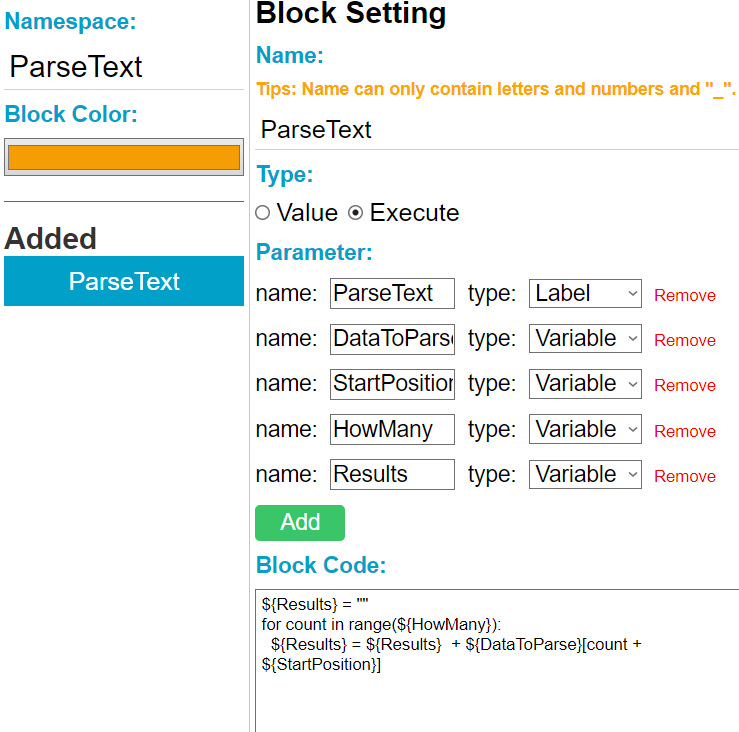
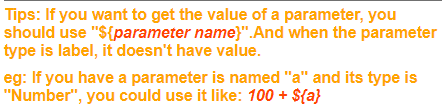
Don't forget to use the ${} to reference your "Variables" when creating the formulas. It also reminds you when in the block creater.
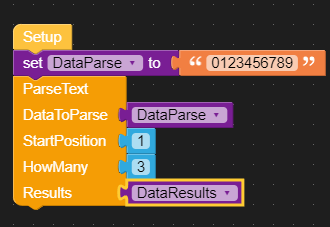
This is what it looks like in UIFLOW. Note the 1st three are inputs and "DataResults" is the output. In my UIFLOW example DataParse and DataResults are UIFLOW variables not the same as the Custom Block variables
Hello! It looks like you're interested in this conversation, but you don't have an account yet.
Getting fed up of having to scroll through the same posts each visit? When you register for an account, you'll always come back to exactly where you were before, and choose to be notified of new replies (either via email, or push notification). You'll also be able to save bookmarks and upvote posts to show your appreciation to other community members.
With your input, this post could be even better 💗
Register Login