No LED support on new releases for the Atom Lite
-
I have an running implementation using UI Flow 1.9.5 and my Atom Lite. It´s working like defined.
After updating to the latest release 1.11.6 the built in LED of my Atom Lite stop working. The Led is still off if I only set color and brightness. Nothing happend.
-
Hello @mchott
with UIFlow 1.11.6 firmware on my M5Atom the RGB LED works just fine.
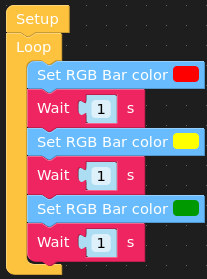
Are you sure your M5Stack is connected to the UIFlow backend?
Thanks
Felix -
@felmue said in No LED support on new releases for the Atom Lite:
e you sure your M5Stack is connected to the UIFlo
Yes I´m sure .. I can for example control the PWM frequency. The Led is also not showing when I connect it to my Mac/PC and hold the button down. Normally the Led shows the current state of App, Internet or USB. But the Led is still dark. If I flash the version 1.9.5 on my Atom and use the same code the Led is switching the colors .. Led seems to work.
In the past I had an different issue with an very easy control of just setting the color: https://www.instagram.com/reel/Cn9XLfWq1_l/?utm_source=ig_web_copy_link
-
-
Now I tried to do it extrem more on a basic level with the latest available versions of everything with Arduino
#include <Arduino.h>
#include <M5Atom.h>

void setup() {
  M5.begin(true, false, true);
  M5.dis.begin();
}

void loop() {
  M5.update();
  M5.dis.drawpix(0, 0xFF0000);
  delay(500);
}
I assumed that this simply meant a permanent "RED", but it results in a random play of colours.

Hello! It looks like you're interested in this conversation, but you don't have an account yet.
Getting fed up of having to scroll through the same posts each visit? When you register for an account, you'll always come back to exactly where you were before, and choose to be notified of new replies (either via email, or push notification). You'll also be able to save bookmarks and upvote posts to show your appreciation to other community members.
With your input, this post could be even better 💗
Register Login