🤖Have you ever tried Chat.M5Stack.com before asking??😎
    M5Stack Community
    • Categories
    • Recent
    • Tags
    • Popular
    • Users
    • Groups
    • Search
    • Register
    • Login

    The image is not displayed

    Scheduled Pinned Locked Moved UiFlow 2.0
    20 Posts 10 Posters 14.9k Views
    Loading More Posts
    • Oldest to Newest
    • Newest to Oldest
    • Most Votes
    Reply
    • Reply as topic
    Log in to reply
    This topic has been deleted. Only users with topic management privileges can see it.
    • ajb2k3A Offline
      ajb2k3
      last edited by ajb2k3

      What pixel size and saved size in the image.
      240X240px images work but they have to be saved in a specific way.
      My little sheep Icon is an example of the image compression. it was designed for a proof of concept forum project and now M5Stack has implemented it into UIFlow2 firmware so that it show each users own logo.

      UIFlow, so easy an adult can learn it!
      If I don't know it, be patient!
      I've ether not learned it or am too drunk to remember it!
      Author of the WIP UIFlow Handbook!
      M5Black, Go, Stick, Core2, and so much more it cant be fit in here!

      1 Reply Last reply Reply Quote 0
      • I Offline
        iosapps420
        last edited by

        the image is 240x240 but i did try different sizes
        the size is 8kb
        is there a software or a converter i can use to edit my icons?
        i tried to save your sheep icon and its also not displaying.
        I use InkScape for editing, maybe there's an option i can use when exporting

        ajb2k3A 1 Reply Last reply Reply Quote 0
        • ajb2k3A Offline
          ajb2k3 @iosapps420
          last edited by

          @iosapps420 I use GIMP for image editing.

          UIFlow, so easy an adult can learn it!
          If I don't know it, be patient!
          I've ether not learned it or am too drunk to remember it!
          Author of the WIP UIFlow Handbook!
          M5Black, Go, Stick, Core2, and so much more it cant be fit in here!

          1 Reply Last reply Reply Quote 0
          • I Offline
            iosapps420
            last edited by

            @ajb2k3 said in The image is not displayed:

            GIMP

            thank you, i'm going to download it, what settings do you use when you export the image/icon?

            thanks

            1 Reply Last reply Reply Quote 0
            • T Offline
              timothychenpc
              last edited by

              it seems like that the official converter(from jpg to .c code) does support JPEG, but not JPG

              1 Reply Last reply Reply Quote 0
              • M Offline
                mukul_100_
                last edited by

                Hi, even i am facing the same issue with uiflow 2, the image is in jpg and 100x100px
                please help.
                Thanks

                ajb2k3A 1 Reply Last reply Reply Quote 0
                • ajb2k3A Offline
                  ajb2k3 @mukul_100_
                  last edited by

                  @mukul_100_ Try saving the file as jpeg not jpg

                  UIFlow, so easy an adult can learn it!
                  If I don't know it, be patient!
                  I've ether not learned it or am too drunk to remember it!
                  Author of the WIP UIFlow Handbook!
                  M5Black, Go, Stick, Core2, and so much more it cant be fit in here!

                  M 1 Reply Last reply Reply Quote 0
                  • M Offline
                    mukul_100_ @ajb2k3
                    last edited by

                    @ajb2k3 hi thank you for the response
                    i did try the suggested jpeg format with a 19kb file and it still shows no image but the default image label shows when no file is given to it
                    can it be the image itself or uiflow 2?

                    M 1 Reply Last reply Reply Quote 0
                    • M Offline
                      mukul_100_ @mukul_100_
                      last edited by

                      @mukul_100_ Has anyone got this working on a M5Dial? if they have i can check what actually is going wrong

                      O 1 Reply Last reply Reply Quote 0
                      • O Offline
                        Otis68 @mukul_100_
                        last edited by Otis68

                        @I'm from Russia. and I apologize for my English. I am writing on this forum through a translator. I can't display a picture either. I work at UiFlow2 . I tried changing PNG formats to JPEG. There is no image. The image itself is 16*16pxl. I do my work with ATOM 3S.
                        mukul_100_

                        1 Reply Last reply Reply Quote 0
                        • N Offline
                          navatek
                          last edited by

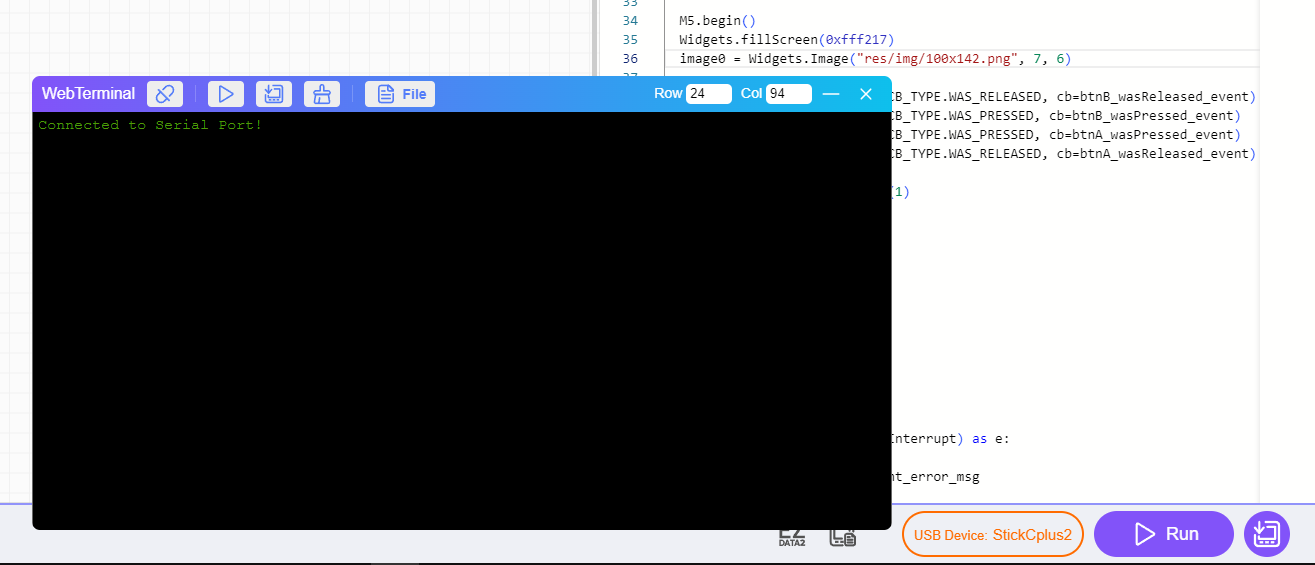
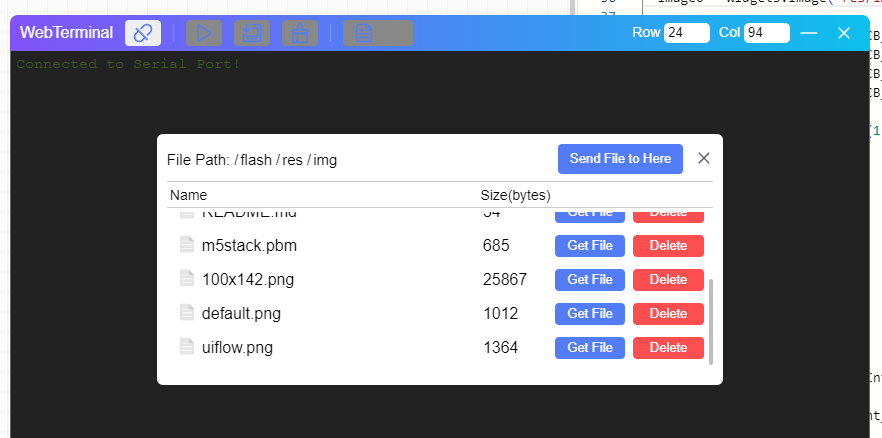
                          to view the images you have to upload them to the res/img folder in the upload window press the file button and select the res/img folder then the send file to here buttonCattura1.PNG Cattura2.PNG

                          B 1 Reply Last reply Reply Quote 0
                          • IAMLIUBOI Offline
                            IAMLIUBO
                            last edited by

                            Hi all,

                            Thanks for report this, I think the main problem is the image format is not right, if you can provide the image to us, that's would be very nice.

                            have a nice day :)
                            BO

                            N 1 Reply Last reply Reply Quote 0
                            • N Offline
                              navatek @IAMLIUBO
                              last edited by navatek

                              @IAMLIUBO hi, i noticed that when you try to load the project in the device if you were to open the WebTerminal when you press the play button to try at the end the terminal writes the image error check height and width. I saw that in the device settings if you select it in the USB Device window, it gives you that error while if you select the device in the My Device window then it doesn't give any problems, so I think it's just a problem of understanding how to set UIFlow2

                              M 1 Reply Last reply Reply Quote 2
                              • M Offline
                                mukul_100_ @navatek
                                last edited by

                                @navatek Hi, thanks a lot for the solution. finally it works and displays images normally
                                i was wondering if you have tried doing the same on arduino or other platforms.

                                1 Reply Last reply Reply Quote 0
                                • B Offline
                                  brianoy @navatek
                                  last edited by

                                  @navatek This works for me. You just save my day.

                                  1 Reply Last reply Reply Quote 0

                                  Hello! It looks like you're interested in this conversation, but you don't have an account yet.

                                  Getting fed up of having to scroll through the same posts each visit? When you register for an account, you'll always come back to exactly where you were before, and choose to be notified of new replies (either via email, or push notification). You'll also be able to save bookmarks and upvote posts to show your appreciation to other community members.

                                  With your input, this post could be even better 💗

                                  Register Login
                                  • First post
                                    Last post