🤖Have you ever tried Chat.M5Stack.com before asking??😎
    M5Stack Community
    • Categories
    • Recent
    • Tags
    • Popular
    • Users
    • Groups
    • Search
    • Register
    • Login

    m5stack tough for power monitoring suggestion

    Scheduled Pinned Locked Moved PROJECTS
    7 Posts 2 Posters 4.5k Views
    Loading More Posts
    • Oldest to Newest
    • Newest to Oldest
    • Most Votes
    Reply
    • Reply as topic
    Log in to reply
    This topic has been deleted. Only users with topic management privileges can see it.
    • A Offline
      aiconnection
      last edited by

      Hi

      I'm looking to monitor amp and voltage usage on a wire with a clamp type transformer sensor and M5stack tough device. I

      I have been trying to use SCT-013 20AMP/1V clamp sensor without any success. The configuration of the sensor is as per the attached figure sct013 wiring.jpg connecting it to the adc 36 pin and 3.3v supply and ground pins.
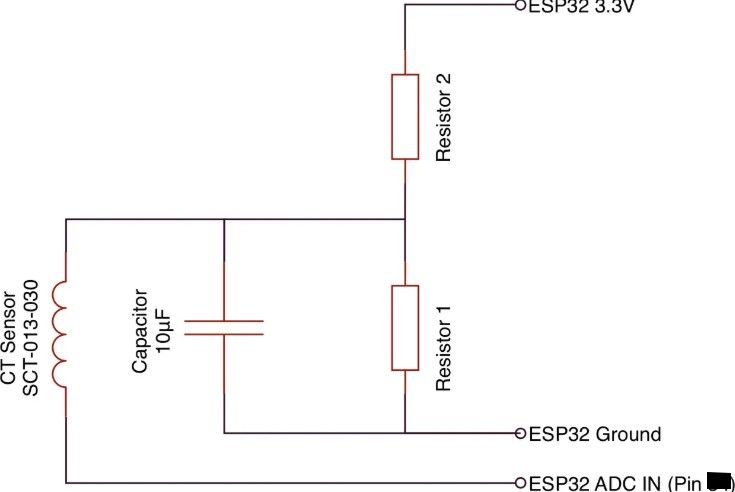
      But not having much of a luck.

      Is there any suggestion on the most cost effective and reliable method of monitoring 20 amps of power on a wire with minimal infrastructure, non invasive connection, using M5 stack tough device. I need specific suggestion on the use of clamp type sensor, code and wiring arrangements.

      Thanks

      robskiR 1 Reply Last reply Reply Quote 1
      • robskiR Offline
        robski @aiconnection
        last edited by robski

        @aiconnection

        what type of load are you monitoring?

        M5StickC, M5StickCPlus, M5StickCplus2,M5GO, M5Core, M5Tough, M5Core2, M5 Demo Board, M5Dial, M5Paper, M5Atom, M5Cardputer, M5StampS3, CoreMP135, StamPLC, AirQ, M5Tab, M5CardputerAdv, M5StackChan

        A 1 Reply Last reply Reply Quote 0
        • A Offline
          aiconnection @robski
          last edited by

          @robski hi I have 20amp, 110v, 60hz load

          robskiR A 2 Replies Last reply Reply Quote 0
          • robskiR Offline
            robski @aiconnection
            last edited by

            @aiconnection what is your code that doesn't work?

            M5StickC, M5StickCPlus, M5StickCplus2,M5GO, M5Core, M5Tough, M5Core2, M5 Demo Board, M5Dial, M5Paper, M5Atom, M5Cardputer, M5StampS3, CoreMP135, StamPLC, AirQ, M5Tab, M5CardputerAdv, M5StackChan

            A 1 Reply Last reply Reply Quote 0
            • A Offline
              aiconnection @aiconnection
              last edited by

              @aiconnection
              import M5
              from M5 import *
              from machine import ADC, Pin
              import time

              ADC_PIN = 35

              label_raw = None

              def setup():
              """Initialize the system."""
              global label_raw
              try:
              log("INFO", "Initializing system")
              M5.begin()
              Widgets.fillScreen(0xffffff) # White background

                  label_raw = Widgets.Label("Raw ADC:", 5, 40, 1.0, 0x000000, 0xffffff, Widgets.FONTS.DejaVu18)
              
              
                  adc = ADC(Pin(ADC_PIN))
                  adc.atten(ADC.ATTN_11DB)  # Set ADC range to 0-3.3V
                  adc.width(ADC.WIDTH_12BIT)  # Set 12-bit resolution
              
                  log("INFO", "System initialized successfully")
                  return adc
              except Exception as e:
                  log("ERROR", f"Setup failed: {str(e)}")
                  time.sleep(5)
                  reset()
              

              def log(level, message):
              """Log messages with a timestamp."""
              ts = time.localtime()
              print(f"[{level}][{ts[3]:02d}:{ts[4]:02d}:{ts[5]:02d}] {message}")

              def loop(adc):
              """Main loop to read and display raw ADC values."""
              try:
              while True:
              # Read raw ADC value
              raw_value = adc.read()

                      # Update display
                      label_raw.setText(f"Raw ADC: {raw_value}")
              
                      # Log raw value
                      log("DEBUG", f"Raw ADC: {raw_value}")
              
                      # Wait before next reading
                      time.sleep(5)
              except Exception as e:
                  log("ERROR", f"Loop error: {str(e)}")
                  time.sleep(5)
                  reset()
              

              if name == 'main':
              try:
              # Initialize system and ADC
              adc = setup()

                  # Start the main loop
                  loop(adc)
              except Exception as e:
                  log("ERROR", f"Fatal error: {str(e)}")
                  time.sleep(5)
                  reset()
              
              1 Reply Last reply Reply Quote 0
              • A Offline
                aiconnection @robski
                last edited by

                @robski good morning..any idea on the code please

                robskiR 1 Reply Last reply Reply Quote 0
                • robskiR Offline
                  robski @aiconnection
                  last edited by

                  @aiconnection your initial post states " connecting it to the adc 36" then in the code posted later : "ADC_PIN = 35"

                  M5StickC, M5StickCPlus, M5StickCplus2,M5GO, M5Core, M5Tough, M5Core2, M5 Demo Board, M5Dial, M5Paper, M5Atom, M5Cardputer, M5StampS3, CoreMP135, StamPLC, AirQ, M5Tab, M5CardputerAdv, M5StackChan

                  1 Reply Last reply Reply Quote 0

                  Hello! It looks like you're interested in this conversation, but you don't have an account yet.

                  Getting fed up of having to scroll through the same posts each visit? When you register for an account, you'll always come back to exactly where you were before, and choose to be notified of new replies (either via email, or push notification). You'll also be able to save bookmarks and upvote posts to show your appreciation to other community members.

                  With your input, this post could be even better 💗

                  Register Login
                  • First post
                    Last post