Convert ASCII to character on UiFlow 2.0
-
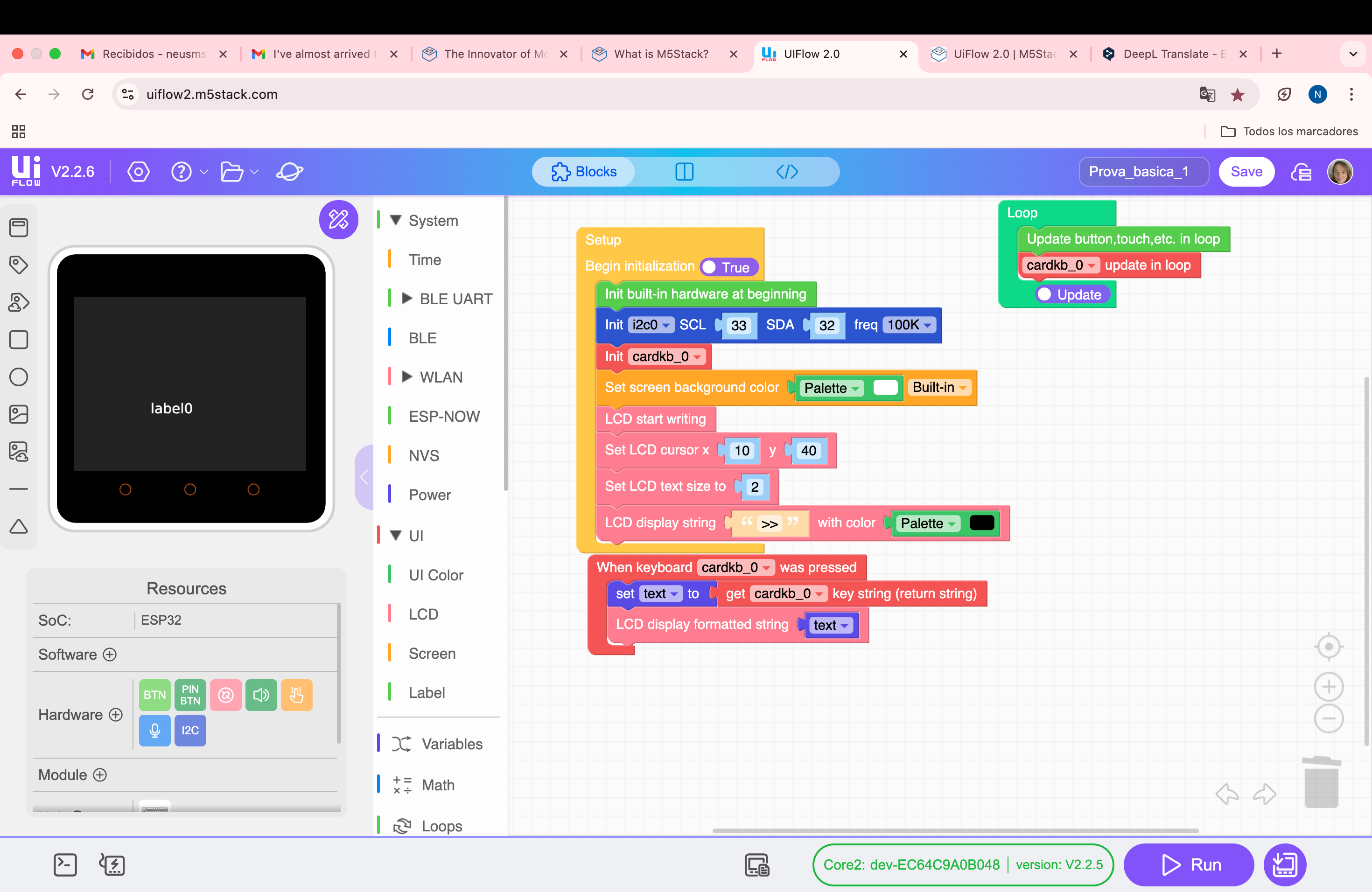
Prova_basica_1:
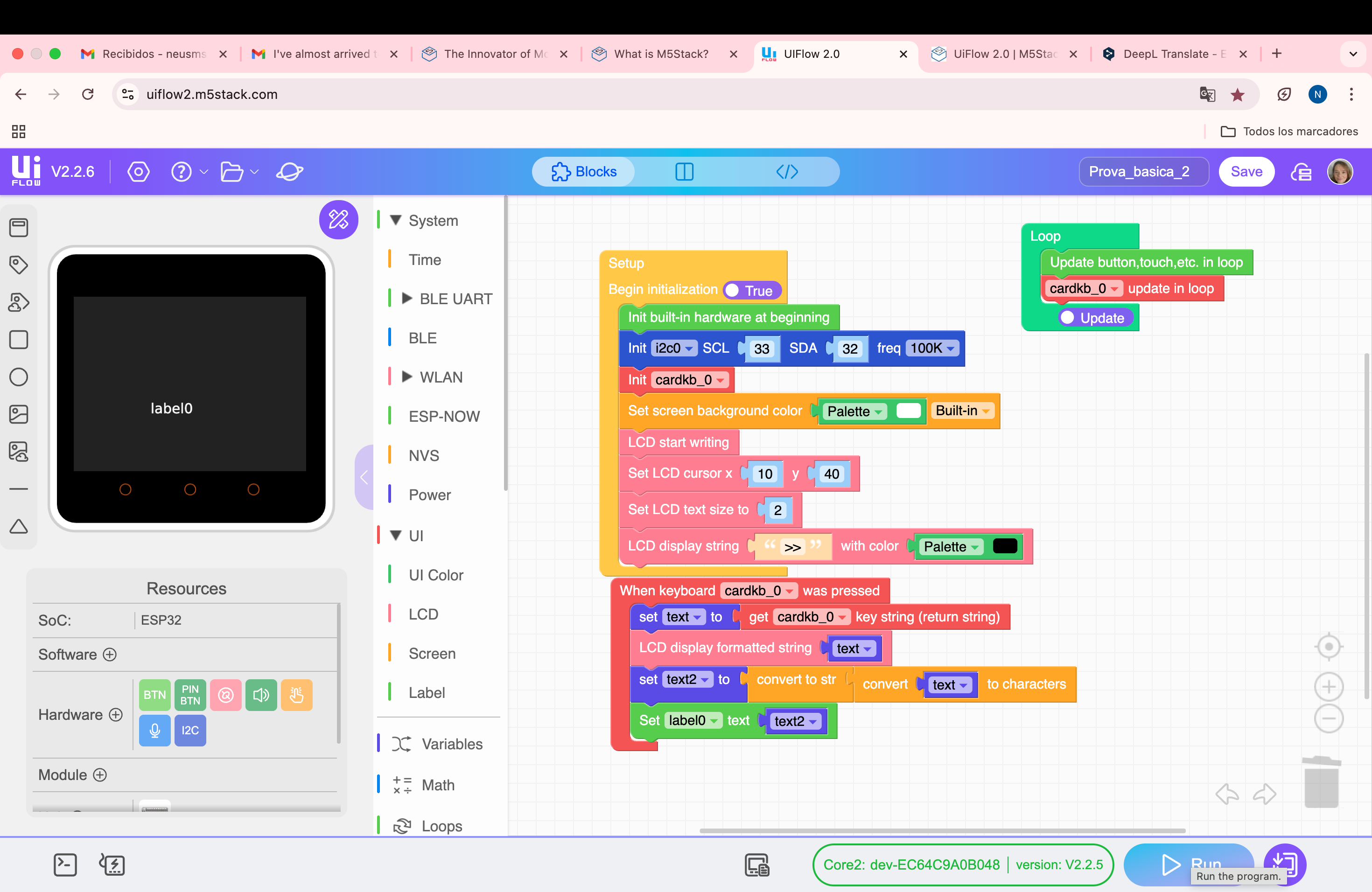
Prova_basica_2
Hello there,
I've almost arrived at my goal!
I've almost arrived at my goal! But; I don't know how I should continue. I will send you two files. They're created with Uiflow 2.0. The first version, named Prova_basica_1 is absolutely functional, and the second one, named Prova_basica_2, is my nightmare!
The trouble finds in the conversion from ASCII code to character, I can't do it
Please, may you aid me?
Thank you, and excuse me for the inconveniences.
Best regards!
P.S. In this message I send you two images from UiFlow 2.0 program and I've just attached below the code from two programs
Code Prova_basica_1:
import os, sys, io
import M5
from M5 import *
from unit import CardKBUnit
from hardware import I2C
from hardware import Pinlabel0 = None
i2c0 = None
cardkb_0 = Nonetext = None
def cardkb_0_pressed_event(kb):
global label0, i2c0, cardkb_0, text
text = cardkb_0.get_string()
M5.Lcd.printf(text)def setup():
global label0, i2c0, cardkb_0, textM5.begin()
Widgets.fillScreen(0x222222)
label0 = Widgets.Label("label0", 105, 143, 1.0, 0xffffff, 0x222222, Widgets.FONTS.DejaVu18)i2c0 = I2C(0, scl=Pin(33), sda=Pin(32), freq=100000)
cardkb_0 = CardKBUnit(i2c0)
cardkb_0.set_callback(cardkb_0_pressed_event)
Widgets.fillScreen(0xffffff)
M5.Lcd.startWrite()
M5.Lcd.setCursor(10, 40)
M5.Lcd.setTextSize(2)
M5.Lcd.print('>>', 0x000000)def loop():
global label0, i2c0, cardkb_0, text
M5.update()
cardkb_0.tick()if name == 'main':
try:
setup()
while True:
loop()
except (Exception, KeyboardInterrupt) as e:
try:
from utility import print_error_msg
print_error_msg(e)
except ImportError:
print("please update to latest firmware")Code Prova_basica_2:
import os, sys, io
import M5
from M5 import *
from unit import CardKBUnit
from hardware import I2C
from hardware import Pinlabel0 = None
i2c0 = None
cardkb_0 = Nonetext = None
text2 = Nonedef cardkb_0_pressed_event(kb):
global label0, i2c0, cardkb_0, text, text2
text = cardkb_0.get_string()
M5.Lcd.printf(text)
text2 = str((chr(text)))
label0.setText(str(text2))def setup():
global label0, i2c0, cardkb_0, text, text2M5.begin()
Widgets.fillScreen(0x222222)
label0 = Widgets.Label("label0", 105, 143, 1.0, 0xffffff, 0x222222, Widgets.FONTS.DejaVu18)i2c0 = I2C(0, scl=Pin(33), sda=Pin(32), freq=100000)
cardkb_0 = CardKBUnit(i2c0)
cardkb_0.set_callback(cardkb_0_pressed_event)
Widgets.fillScreen(0xffffff)
M5.Lcd.startWrite()
M5.Lcd.setCursor(10, 40)
M5.Lcd.setTextSize(2)
M5.Lcd.print('>>', 0x000000)def loop():
global label0, i2c0, cardkb_0, text, text2
M5.update()
cardkb_0.tick()if name == 'main':
try:
setup()
while True:
loop()
except (Exception, KeyboardInterrupt) as e:
try:
from utility import print_error_msg
print_error_msg(e)
except ImportError:
print("please update to latest firmware") -
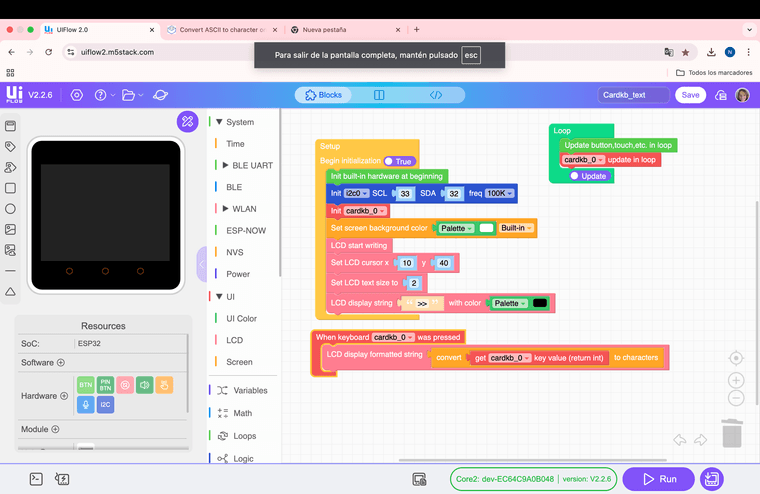
I got it!!
Sorry, the trouble was very simple!... If you want, the solution is below:

Hello! It looks like you're interested in this conversation, but you don't have an account yet.
Getting fed up of having to scroll through the same posts each visit? When you register for an account, you'll always come back to exactly where you were before, and choose to be notified of new replies (either via email, or push notification). You'll also be able to save bookmarks and upvote posts to show your appreciation to other community members.
With your input, this post could be even better 💗
Register Login