使用UIFlow2的M5GFX积木切换图片,图片组件崩溃问题
-
我在UIFlow2.3.3里使用M5GFX实现最简单的图片切换,频繁切换后发现,图片无法再切换,但系统还在运行,只是不能切换图片,怀疑应该是图片组件崩溃了。我尝试用gc.collect强制回收也没有效果,gc.mem_free监测发现内存一直持续减少。以下是我的UIFlow设计和相应的代码:
import os, sys, io, gc
import M5
from M5 import *ImageSwitchFlag = None
def GcCollectAndPrint():
global ImageSwitchFlag
gc.collect()
print(gc.mem_free())
passdef btnA_wasClicked_event(state):
global ImageSwitchFlag
if ImageSwitchFlag == 0:
M5.Lcd.drawImage("/flash/res/img/RotaryBGBacklight.jpg", 0, 0)
GcCollectAndPrint()
ImageSwitchFlag = 1
elif ImageSwitchFlag == 1:
M5.Lcd.drawImage("/flash/res/img/RotaryBGBT.jpg", 0, 0)
GcCollectAndPrint()
ImageSwitchFlag = 0def setup():
global ImageSwitchFlagM5.begin()
Widgets.fillScreen(0x000000)BtnA.setCallback(type=BtnA.CB_TYPE.WAS_CLICKED, cb=btnA_wasClicked_event)
ImageSwitchFlag = 0
def loop():
global ImageSwitchFlag
M5.update()if name == 'main':
try:
setup()
while True:
loop()
except (Exception, KeyboardInterrupt) as e:
try:
from utility import print_error_msg
print_error_msg(e)
except ImportError:
print("please update to latest firmware")******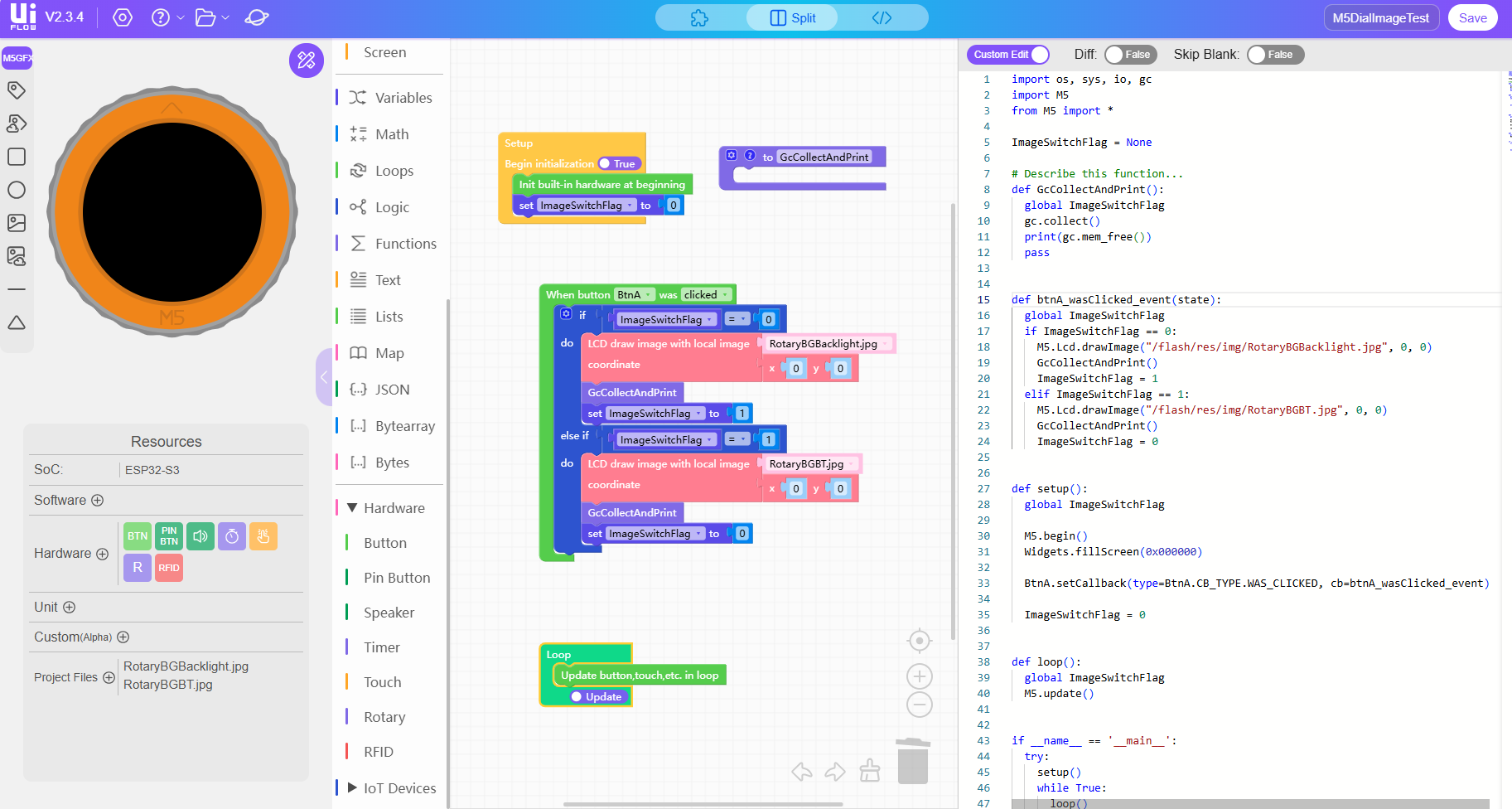 b442ffec-d9ce-4445-898c-4b8ffc3caa82-image.png
 -
@zhumingqi
已知问题,会排期修复 -
@kuriko OKOK

Hello! It looks like you're interested in this conversation, but you don't have an account yet.
Getting fed up of having to scroll through the same posts each visit? When you register for an account, you'll always come back to exactly where you were before, and choose to be notified of new replies (either via email, or push notification). You'll also be able to save bookmarks and upvote posts to show your appreciation to other community members.
With your input, this post could be even better 💗
Register Login