🤖Have you ever tried Chat.M5Stack.com before asking??😎
    M5Stack Community
    • Categories
    • Recent
    • Tags
    • Popular
    • Users
    • Groups
    • Search
    • Register
    • Login

    Degrees C Symbol

    Scheduled Pinned Locked Moved General
    11 Posts 4 Posters 24.9k Views 2 Watching
    Loading More Posts
    • Oldest to Newest
    • Newest to Oldest
    • Most Votes
    Reply
    • Reply as topic
    Log in to reply
    This topic has been deleted. Only users with topic management privileges can see it.
    • R Offline
      richardmckenna
      last edited by richardmckenna

      Hi all,

      I can't seem to find the answer to this anywhere. I'm using the Arduino API and trying to display the degrees C symbol eg 5.2ºC in M5.Lcd.printf("%0.1f%cC", temp, (char)000) but can't for the life of me find what number I need for (char)000

      Can anyone help?

      m5stackM 1 Reply Last reply Reply Quote 0
      • m5stackM Online
        m5stack @richardmckenna
        last edited by

        @richardmckenna The character " ° " is not in the range of ASCII code. So it cannot be displayed, maybe you can try to use " 'C " symbol instead, it will look more same

        R 1 Reply Last reply Reply Quote 0
        • R Offline
          richardmckenna @m5stack
          last edited by

          @m5stack hmmm ok that's a shame.

          I don't suppose you can suggest any other way of displaying it? Would have thought it was a common thing to do given temperature applications are a popular thing for this kind of hardware.

          Is there any documentation on what characters are available? Or is it just the standard ASCII set but not the extended set?

          m5stackM 1 Reply Last reply Reply Quote 0
          • m5stackM Online
            m5stack @richardmckenna
            last edited by

            @richardmckenna You can refer to this Unicode example, but in fact it still does not support displaying " ° ", but will be able to display more characters. Please pay attention to the content of the notes when using.

            Github link: https://github.com/m5stack/M5Stack/tree/master/examples/Advanced/Display_Unicode

            R 1 Reply Last reply Reply Quote 0
            • R Offline
              richardmckenna @m5stack
              last edited by

              @m5stack Thank you I will take a look.

              1 Reply Last reply Reply Quote 0
              • world101W Offline
                world101
                last edited by

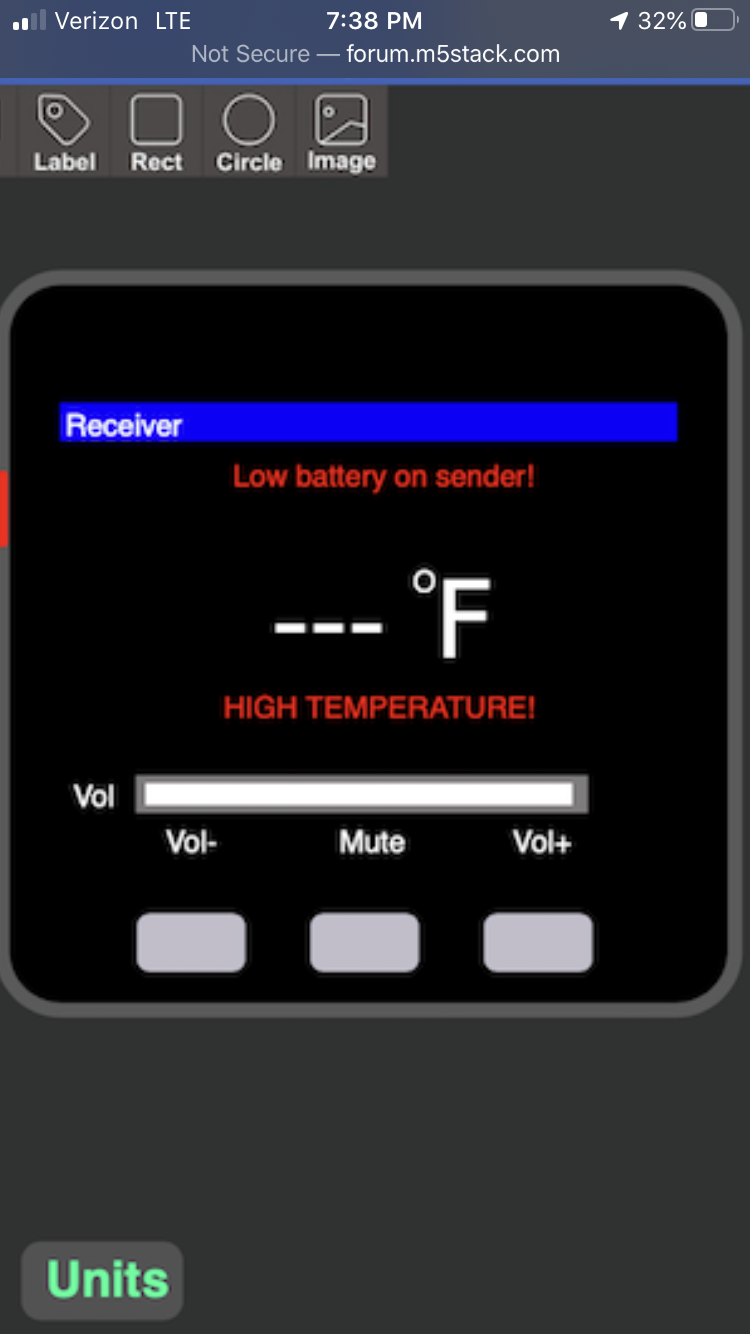
                I manually create the degree symbol by drawing a white circle and then a smaller black circle on top. But it takes some trial and error depending on your text size.
                0_1581727191781_7FD03DD7-6488-49BD-8880-252ED1225F89.png

                R 1 Reply Last reply Reply Quote 0
                • R Offline
                  richardmckenna @world101
                  last edited by

                  @world101 thanks. I think I will do this.

                  1 Reply Last reply Reply Quote 0
                  • P Offline
                    peter153
                    last edited by

                    This post is deleted!
                    1 Reply Last reply Reply Quote 0
                    • P Offline
                      peter153
                      last edited by

                      This post is deleted!
                      1 Reply Last reply Reply Quote 0
                      • P Offline
                        peter153
                        last edited by

                        //Fake degrees C Symbol

                        String strTemp;
                        strTemp = String(temp1 + strtof(&adj1[0], NULL));
                        strTemp += " C";
                        
                        M5.Lcd.drawCentreString(strTemp,320/2,50,1);
                        //M5.Lcd.print(String(temp1 + strtof(&adj1[0], NULL))+"℃"); //broken --;
                        
                        int nTempLen=strTemp.length();
                        M5.Lcd.setTextSize(1);
                        M5.Lcd.setCursor(2, 50);
                        M5.Lcd.print("Sensor");
                        M5.Lcd.print(" 1");
                        if(nTempLen==6)
                        {
                        M5.Lcd.setCursor(195, 45);
                        }
                        else if(nTempLen==7)
                        {
                         M5.Lcd.setCursor(205, 45);
                        }
                        else if(nTempLen==8)
                        {
                         M5.Lcd.setCursor(216, 45);
                        }
                        else
                        {
                         M5.Lcd.setCursor(200, 45);
                        }
                        
                        M5.Lcd.setTextSize(2);
                        M5.Lcd.print("o"); //lowcase o
                        
                        1 Reply Last reply Reply Quote 0
                        • world101W Offline
                          world101
                          last edited by world101

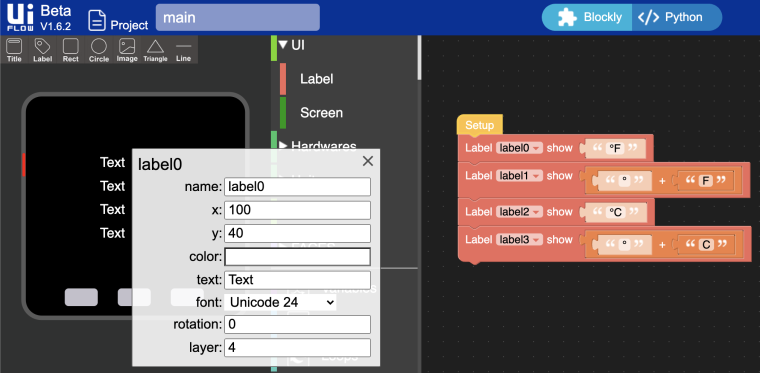
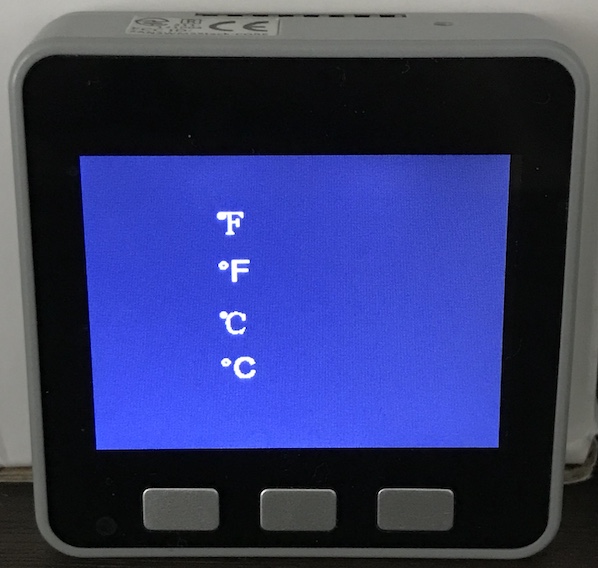
                          Just an update. I noticed that uiFlow now supports Unicode characters. I'm not sure in which release it was introduced, but I'm now able to add the degree symbol to a label using characters from this site.
                          0_1597847503341_Screen Shot 2020-08-19 at 10.30.19 AM.png

                          0_1597847839632_IMG_1578.jpg

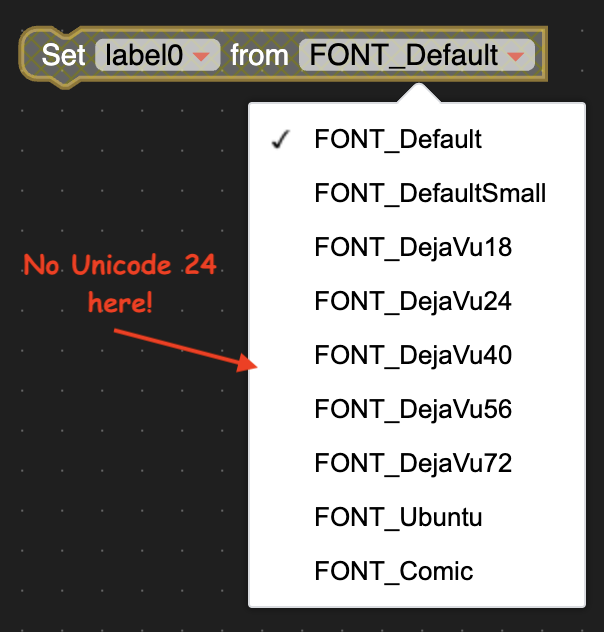
                          Two drawbacks...

                          • Size is fixed at unicode 24 (similar in size to DejaVu 24).
                          • Unicode 24 is missing from the label set font block
                            0_1597848114456_Screen Shot 2020-08-19 at 10.31.33 AM.png
                          1 Reply Last reply Reply Quote 0

                          Hello! It looks like you're interested in this conversation, but you don't have an account yet.

                          Getting fed up of having to scroll through the same posts each visit? When you register for an account, you'll always come back to exactly where you were before, and choose to be notified of new replies (either via email, or push notification). You'll also be able to save bookmarks and upvote posts to show your appreciation to other community members.

                          With your input, this post could be even better 💗

                          Register Login
                          • First post
                            Last post