sim800l gprs + mqtt
-
Is there an example to use the m5stack with the sim800l module and to use the mqtt protocol?
-
I'm also planning to try it. I will follow the step by step tutorial from Random Nerd Tutorials (Rui and Sara Santos).
Here is the link to their tutorial sending data collected from a BME 280 (M5Stack ENV unit) using an ESP32 to a MTTQ cloud:https://randomnerdtutorials.com/esp32-sim800l-publish-data-to-cloud/
I'm planning using M5stacks monitoring beehives and sending data (environement, weight, sound recording, beecount) to an MTTQ Sever either by WiFi, gprs or LoRa.
good luck crami25
-
I was unable to get sim800l working when I tried, but then I think thats due to me not knowing how to debug it. There are quite a few resources around the forum and elsewhere if you search
http://forum.m5stack.com/topic/539/lesson-22-modules-sim800l
http://forum.m5stack.com/topic/164/sim800l/3
https://www.hackster.io/merryq/automation-with-sim800l-esp32-m5stack-170a82
http://forum.m5stack.com/post/7490
http://forum.m5stack.com/post/2688
http://forum.m5stack.com/topic/595/how-to-use-gps-module-with-sim800l-module/9 -
To start understanding the functioning of the sim800l module I used the following example:
//Reset resistance is not soldered. If necessary, weld it yourself.
#include <M5Stack.h>
#define RX_PIN 16
#define TX_PIN 17
#define RESET_PIN 5void header(const char *string, uint16_t color){
M5.Lcd.fillScreen(color);
M5.Lcd.setTextSize(1);
M5.Lcd.setTextColor(TFT_MAGENTA, TFT_BLUE);
M5.Lcd.fillRect(0, 0, 320, 30, TFT_BLUE);
M5.Lcd.setTextDatum(TC_DATUM);
M5.Lcd.drawString(string, 160, 3, 4);
}void setup() {
M5.begin();header("SIM800L AT command", TFT_BLACK);
M5.Lcd.setTextFont(2);
M5.Lcd.setTextColor(TFT_WHITE, TFT_BLACK);
M5.Lcd.drawString("Please use serial port to Test AT command.",0, 35, 2);
// Host serial communication
Serial.begin(115200);// SIM800L serial communication
Serial2.begin(115200, SERIAL_8N1, RX_PIN, TX_PIN);
pinMode(RESET_PIN, OUTPUT);
}void loop() {
//AT instruction write
if(Serial.available()){
Serial2.write(Serial.read());
}//AT instruction result
if(Serial2.available()){
Serial.write(Serial2.read());
}delay(10);
}
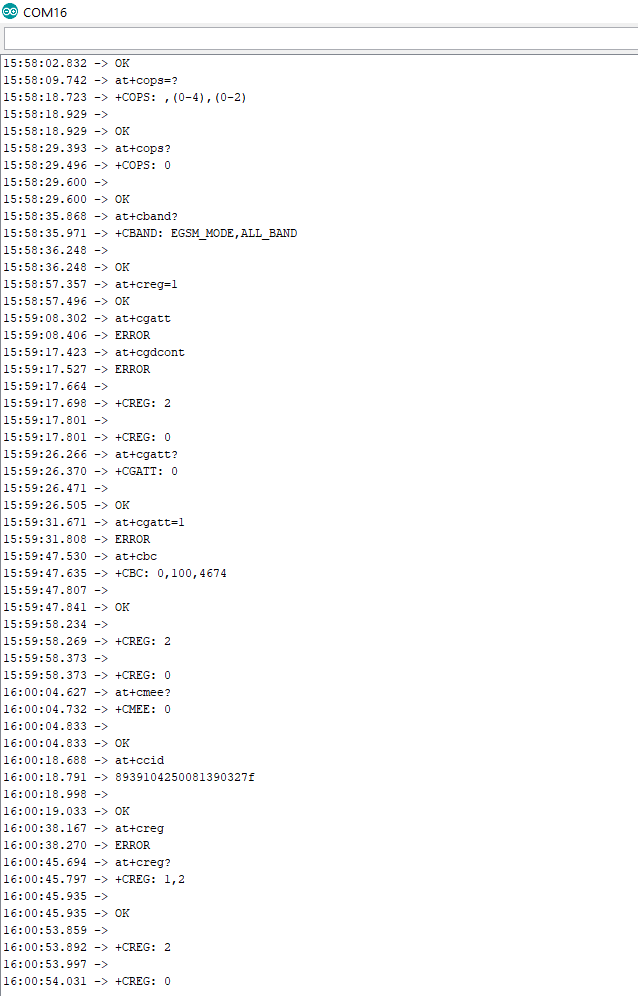
I sent some at command to understand if the module worked but apparently it doesn't work. Any suggestions?

Hello! It looks like you're interested in this conversation, but you don't have an account yet.
Getting fed up of having to scroll through the same posts each visit? When you register for an account, you'll always come back to exactly where you were before, and choose to be notified of new replies (either via email, or push notification). You'll also be able to save bookmarks and upvote posts to show your appreciation to other community members.
With your input, this post could be even better 💗
Register Login