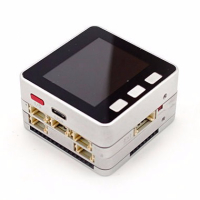
M5STACK FIRE Won't change or turn ON.
-
I just received my M5STACK FIRE yesterday and I have not been able to use it as yet. It won't turn ON or Charge. When I plug the included USB cable into the battery port a red light glows but that is all. When I press the ON button it will not turn on. I have used an Anker RP-PB077 still nothing. I have misc adapters etc. I sincerely appreciate everyone's help and advice. This my first time to ask for help.
-
even if connect the USB to the FIRE (not the charge base , and you could try to remove the battery bottom) it still can't boot , you could contact the store.
-
M5ez is an Arduino library. To start using it with the Arduino IDE:
Choose Sketch -> Include Library -> Manage Libraries...
Type M5ez into the search box.
Click the row to select the library.
Click the Install button to install the library.
Repeat this process for the ezTime library
in File -> Examples you will now see an M5ez heading down under "Examples from custom libraries"You'll have your first application on the screen in no time. You can also start with one of the sketches below in the "Menus" section of the documentation. In fact we strongly recommend that you play around with the M5ez demo application, since it is a comprehensive showcase of M5ez's functionality that will give you a good feel for what you can and cannot do with M5ez.
Hello! It looks like you're interested in this conversation, but you don't have an account yet.
Getting fed up of having to scroll through the same posts each visit? When you register for an account, you'll always come back to exactly where you were before, and choose to be notified of new replies (either via email, or push notification). You'll also be able to save bookmarks and upvote posts to show your appreciation to other community members.
With your input, this post could be even better 💗
Register Login