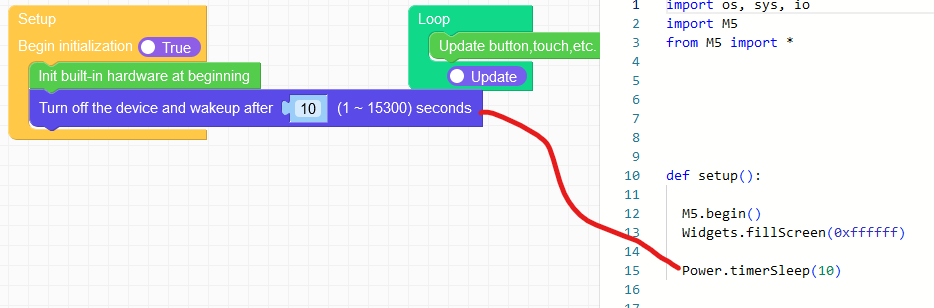
Here is a workaround for UIFLow2.0:
import M5
import hardware
import time
# UIFlow2.0 workaround for M5.Power.timerSleep() not working properly
# on SOME CoreINK devices. On these decvices the board-power is not
# proberly turned off. However, the M5.Power.powerOff() does work
# for these devices, i.e. turning board-power properly off
M5.begin()
#init i2c bus with pins connected to the RTC
i2c0 = hardware.I2C(0, scl=hardware.Pin(22), sda=hardware.Pin(21), freq=400000)
##### Put your code here.
time.sleep(3)
##### code substitution the timerSleep() function
# Set registers of the RTC. ref datasheet for BM8563 RTC for further info
# reg 0x00 always 00h
# reg 0x01 bit 2-7: always 0, bit 0: enable/disable timer int
# 0x01 = timer enabled
reg00_01 = bytearray([0x00, 0x01])
# reg 0x0D always 00h - clock out disabled
# reg 0x0E bit 7: endable/disable timer, bit 0-1 timer resolution
# 10=sec 11 = min
# 0x82 = int enabled and seconds resolution
# reg 0x0F timer value 0-255
# 0x14 = 20d = 20 sec. if reg 0x0E = 0x83 then 20 min
reg0D_0F = bytearray([0x00, 0x82, 0x14])
# i2c device address of RTC is 0x51
# Write to register address 0x00-0x01
i2c0.writeto_mem(0x51,0x00, reg00_01)
# Write to register adsress 0x0D-0x0F
i2c0.writeto_mem(0x51,0x0D, reg0D_0F)
M5.Power.powerOff()
##### end of code substitution the timerSleep() function