How does one use Block Maker?
-
So I went to http://block-maker.m5stack.com/, put in my code. Now what? There's no save/download/whatever, and cutting and pasting into a .m5b file doesn't work.
If I use the Beta create m5b file in the tool, when I hit download, I get an empty file:
{"category":"RGB2","color":"#8000ff","blocks":["__RGB2_setScreenColorRGB"],"jscode":""}
So, what's the secret? I've tried to copy the butterfly.m5b file in terms of escaping quotes and such, but when I try to load it, the UI just ignores it. No message, no error, it just leaves up the "open *.m5b" menu.
It's not like I'm doing anything complicated: I just want to be able to set the background to an arbitrary RGB value, rather than a pre-defined color.
-
There is a Download button. You might need to adjust your browser resolution or if on mobile device turn it landscape.
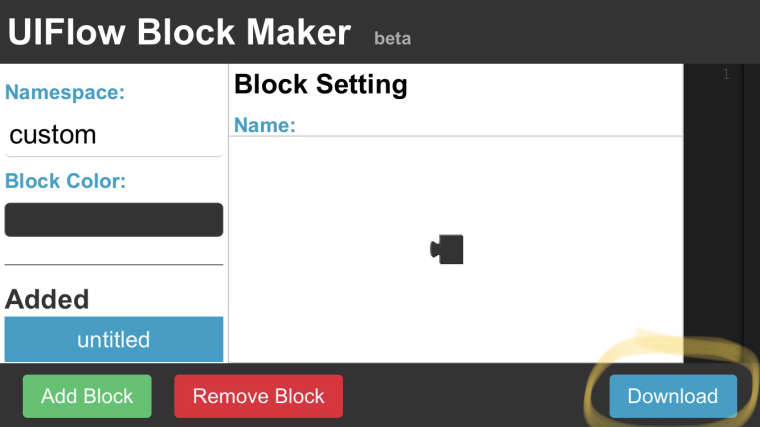
Save the file and open it in uiFlow.
-
Thanks! Yeah, one can't scroll down to it: You have to have a display that is big enough (or a resolution high enough) to see it.

Hello! It looks like you're interested in this conversation, but you don't have an account yet.
Getting fed up of having to scroll through the same posts each visit? When you register for an account, you'll always come back to exactly where you were before, and choose to be notified of new replies (either via email, or push notification). You'll also be able to save bookmarks and upvote posts to show your appreciation to other community members.
With your input, this post could be even better 💗
Register Login