Azure IoT Handle Example for Speaker play_cloud command?
-
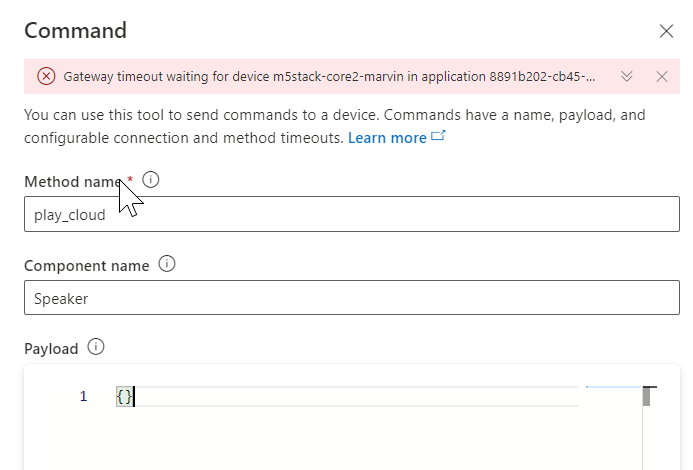
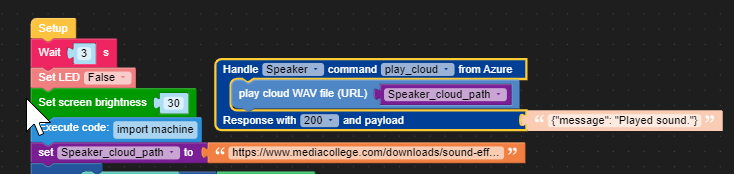
Anyone know what to put here for the Payload? I want to play a sound with the play_cloud command.
-
I added it to my model so you get a UI field in Azure now for pasting in the cloud wav file URL:
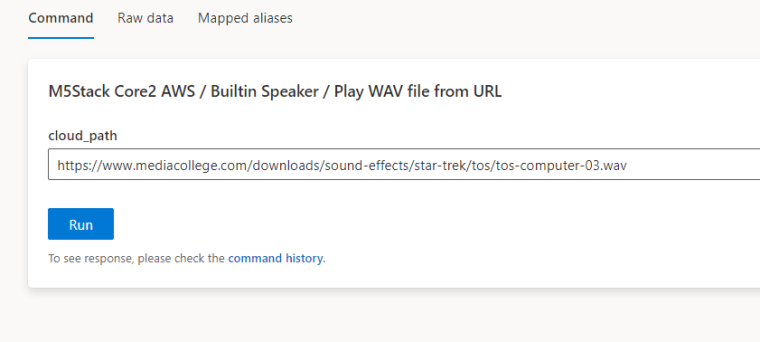
The command gets to the device but it can't parse it for some reason, get a Data Format Invalid error.
Traceback (most recent call last): File "libs/m5mqtt.py", line 101, in _msg_deal_task File "libs/m5mqtt.py", line 88, in update File "umqtt/robust.py", line 80, in check_msg File "umqtt/simple.py", line 271, in check_msg File "umqtt/simple.py", line 259, in wait_msg File "libs/m5mqtt.py", line 50, in _on_data File "IoTcloud/Azure.py", line 333, in direct_method_cb File "main.py", line 32, in azure_direct_Speaker_play_cloud File "hardware/speaker.py", line 135, in playCloudWAV File "hardware/speaker.py", line 82, in playWAV ValueError: Data Format is not valid -
I also tested this with a local file but get a different error:
OSError [Errno 2] ENOENT -
In case anyone else has the same issue...the handler works if you hard-code the path to the Wav file
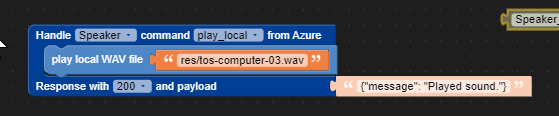
but cloud path doesn't work with the same trick, it still gives the Data format is not valid error.

Hello! It looks like you're interested in this conversation, but you don't have an account yet.
Getting fed up of having to scroll through the same posts each visit? When you register for an account, you'll always come back to exactly where you were before, and choose to be notified of new replies (either via email, or push notification). You'll also be able to save bookmarks and upvote posts to show your appreciation to other community members.
With your input, this post could be even better 💗
Register Login