Core2 + Face RFID cannot get work
-
I bougth Core2 + Faced RFID. With FlowUI I can get all work, but I want to make some Arduino code, because want to have faster boot, FlowUI have own boot logo etc.
If I use M5Stack library Core2 wont boot.
If I use this code wont work: https://github.com/m5stack/M5Stack/blob/master/examples/Face/RFID/RFID.inoOnly M5Core2.h working, but cannot get RFID to work.
Have anyone tried this?
-
Hello,
How can I connect a core2 to a faces II with an RFID?
The faces II male connector is too short to plug into the female connector inside the core2.
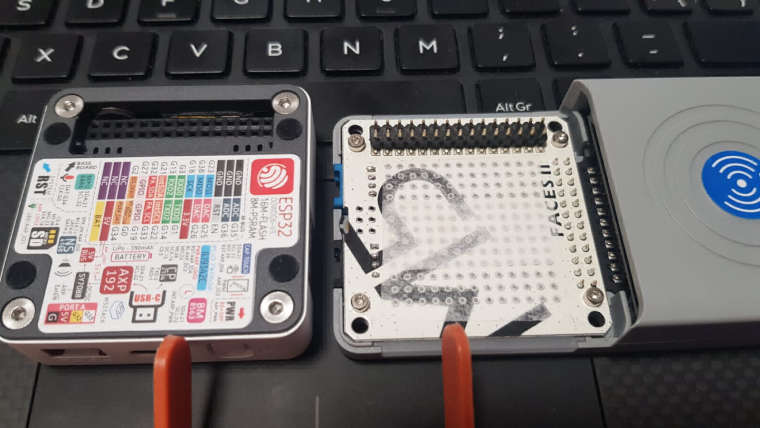
Thank you.! -
Hello @antzaro
I think you'll first need to remove the dark grey bottom plate of the M5Core2 which is held in place by four screws. Please be careful when doing so as the battery is attached (double sided tape) to the bottom plate while its wire is connected to the M5Core2 main PCB using a small connector. Without the bottom plate the M5Core2 should fit onto the Face RFID.
Thanks
Felix -
I found an example that fits your needs. It is called 'escornaFID' https://github.com/avilmaru/escornafid_para_m5stackcore2
They use a modified library, not the one you find in Arduino Repository, and works like a charm....
-
@jvaleri what files did you use from that github repository? These ones:
escornafid_para_m5stackcore2/firmware_escornabot/arduino_modificado_MFRC522-1.6.2/Escornabot/MFRC522Interface.* or the zip file? -
Thanks for posting this link!

Hello! It looks like you're interested in this conversation, but you don't have an account yet.
Getting fed up of having to scroll through the same posts each visit? When you register for an account, you'll always come back to exactly where you were before, and choose to be notified of new replies (either via email, or push notification). You'll also be able to save bookmarks and upvote posts to show your appreciation to other community members.
With your input, this post could be even better 💗
Register Login