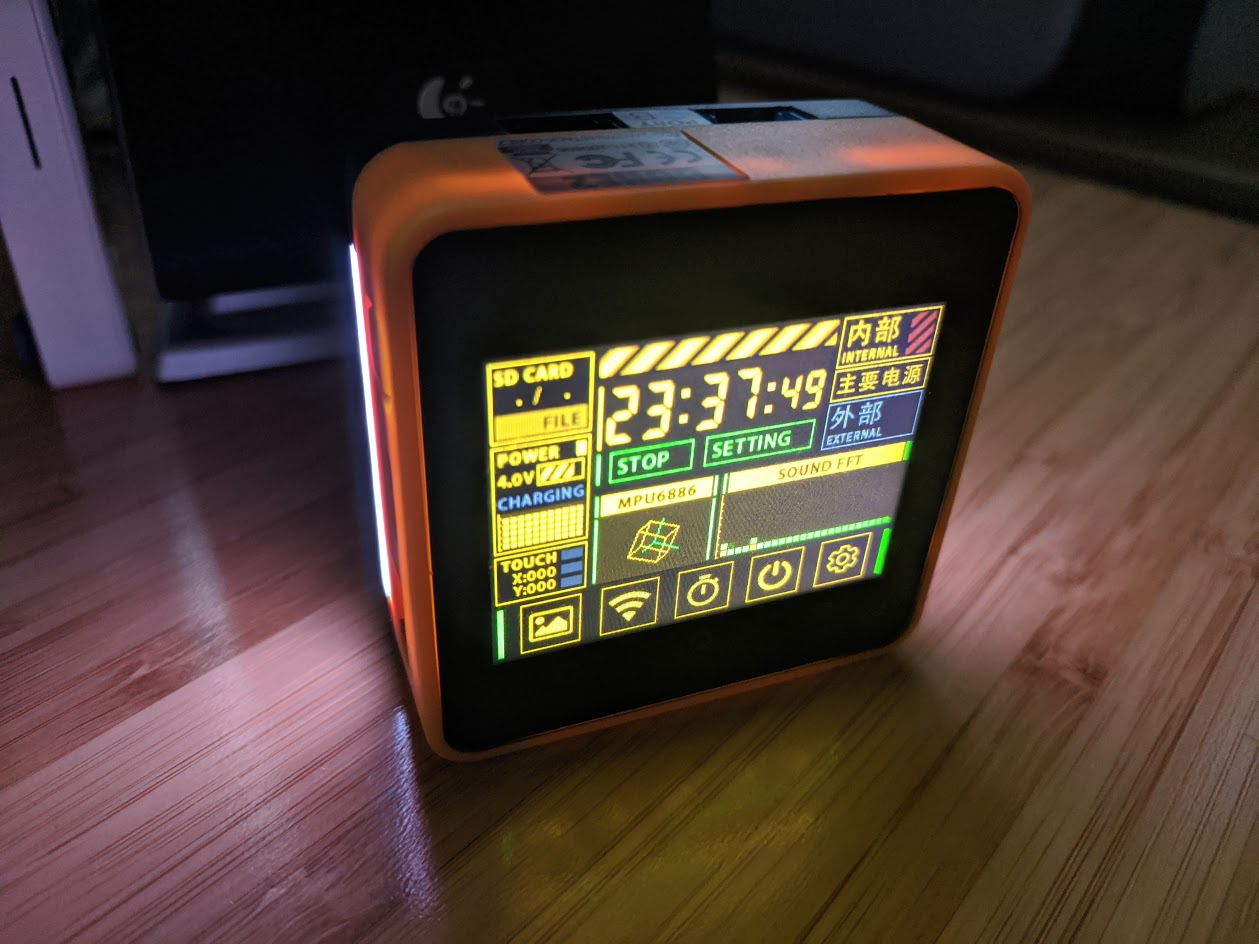
Building Core2 FactoryDemo in PlatformIO
-
If anyone else is trying to do this you'll need to fix your partition table to take advantage of the larger memory. The steps how to do this are:
- Go to PIO Home in Visual Studio Code
- Click on
+New Project - Name it m5core2 or similar. Choose
M5Stack Core ESP32for the board. - Leave Framework set to Arduino.
- Open your platformio.ini file and replace the text with this:
[env:m5stack-core-esp32] platform = espressif32 board = m5stack-core-esp32 framework = arduino ; [[[for macos]]] ;upload_port = /dev/cu.SLAB_USBtoUART ; [[[fix PSRAM size and you won't need have this file]]] board_build.partitions = default_16MB.csv build_flags = -DBOARD_HAS_PSRAM -mfix-esp32-psram-cache-issue- Copy the 16MB partition table file into your src directory. You can download this file here:
https://github.com/espressif/arduino-esp32/blob/master/tools/partitions/default_16MB.csv
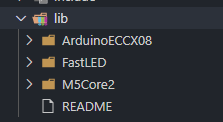
- In the 'lib' directory you will need three libraries.
FastLED - https://github.com/FastLED/FastLED
M5Core2 - https://github.com/m5stack/M5Core2
ArduinoECCX08 - This one is in a zip file in the M5Core2 library repo:
https://github.com/m5stack/M5Core2/blob/master/examples/core2_for_aws/ArduinoECCX08.zip
Your lib directory should look like this when you're done:
- Now copy everything from the example FactoryTest directory in the M5Core2 library into your
srcfolder. The directory files can be viewed here:
https://github.com/m5stack/M5Core2/tree/master/examples/core2_for_aws/FactoryTest
-
Rename FactoryTest.ino to main.cpp
-
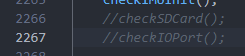
Edit main.cpp and comment out these two lines with
//. These tests will fail if you don't have an SDCard or something plugged into the IO port.
-
Connect your M5Core2 and build/upload. You can do CTRL-Shift-P to find the Platformio:Upload option.
-
Play with the cool factory demo!
Thanks to jokercatz for the tip on fixing the platform:
http://jokercatz.blogspot.com/2020/11/m5stack-core2-build-from-platformio.html -
Great post! thank you for sharing your with us your knowledge, will be pretty useful for many users over here.
-
Could i build and upload every example ( in my case the Core2 AWS ) with platform IO or i need to use idf.py from ESP-IDF ?
When i use platform IO i already have the ESP-IDF install i suppose.In all cases i need it to edit the configuration with the command "idf.py menuconfig" (right?), example in this step https://edukit.workshop.aws/en/blinky-hello-world/connecting-to-aws.html#configuring-the-esp32-firmware
-
There are modifications that need to be done to use all the examples with PlatformIO. Currently we are requiring the use of ESP-IDF v4.2 and at the moment PlatformIO only supports 4.1. You could modify the projects and they should work:
- Rename the "main" directory to "src"
- Possibly update cmakelists.txt files (depends on example)
-
Hi @greenleaf Are you using the M5GO Battery Bottom2? Tried following your step-by-step and it is just stuck at AT608A Check failed.
Mine is core2 without the battery bottom.
Thanks,
smua -
This is specifically for the Core2 for AWS IoT EduKit hardware. The regular Core2 and/or the standard M5Go bottom will not work with this firmware.
Head of the AWS IoT EduKit program and AWS employee. Not an M5Stack employee.
-
@greenleaf said in Building Core2 FactoryDemo in PlatformIO:
http://jokercatz.blogspot.com/2020/11/m5stack-core2-build-from-platformio.html
Thanks for the guidance.
How could this be adjusted for the M5AtomLite, M5Stack Basic and M5Paper ? -
@rashedtalukder Actually if you comment out the code checking for AT608A chip it works on plain Core 2
-
I found the actual Factory Test code for the Core 2 as this example is for the AWS Core 2
https://github.com/m5stack/M5-ProductExampleCodes/tree/master/Core/M5Core2/Arduino -
There are pin differences for some of the features, but yes you can disable the atecc608 part of the code.
-
Thanks, I needed this so much!
-
bool Device = 1; // Please select your device
// Core2 = 1,Core2_AWS = 0;I Chaged from 0 to 1


Hello! It looks like you're interested in this conversation, but you don't have an account yet.
Getting fed up of having to scroll through the same posts each visit? When you register for an account, you'll always come back to exactly where you were before, and choose to be notified of new replies (either via email, or push notification). You'll also be able to save bookmarks and upvote posts to show your appreciation to other community members.
With your input, this post could be even better 💗
Register Login