Proper way to handle button (in hour counter)
-
Hey, I am trying to do a hour counter with possibility to reset it to zero when button will be pressed.
An actual flow is:
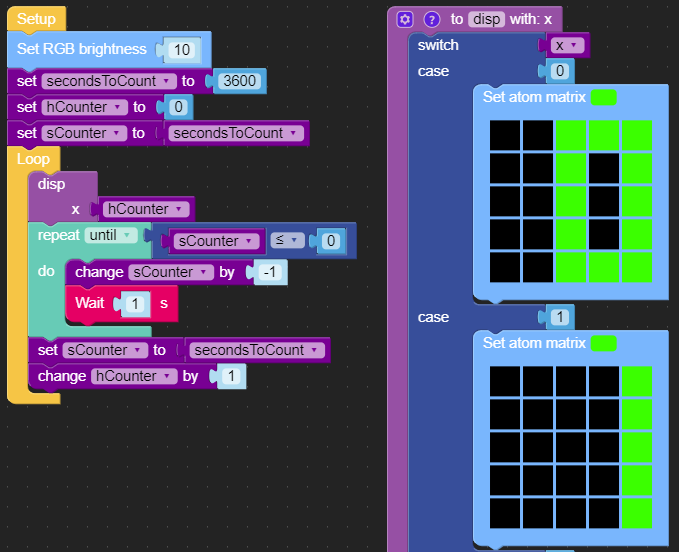
Function disp just displaying large numbers 0 to 15.
To speed things up a variable secondsToCount can be decreased to let's say 5. -
Just add the “Button A wasPressed” callback (located in the Event blockly menu) to your flow and within that block, reset your counter values to the same as in the Setup function.

Hello! It looks like you're interested in this conversation, but you don't have an account yet.
Getting fed up of having to scroll through the same posts each visit? When you register for an account, you'll always come back to exactly where you were before, and choose to be notified of new replies (either via email, or push notification). You'll also be able to save bookmarks and upvote posts to show your appreciation to other community members.
With your input, this post could be even better 💗
Register Login