Unit V2 Wi-Fi AP
-
Hi Everyone,
I just got the Unit V2.
I did not see a new AP when connecting it to a USB power supply so I connected it to my Laptop running MacOS and a new network adapter showed up.
I was able to ssh to the device by using the default credentials. However, I was not able to login as root or using sudo. This is the error I get when trying sudo:
unitv2% sudo sh
sudo: /usr/bin/sudo must be owned by uid 0 and have the setuid bit setunitv2% ls -la /usr/bin/sudo
-rwxr-xr-x 1 avahi avahi 83152 Apr 5 2021 /usr/bin/sudo -
There are more problems without "root" :(
unitv2% date -u 060511102021
date: can't set date: Operation not permitted
Sat Jun 5 11:10:00 UTC 2021
unitv2% date
Thu Jan 1 00:18:32 UTC 1970 -
I'd solv it.
You can change the device to notebook mode. There have terminal in notebook. The terminal in notebook can run command su by no password. Have a pleasure. -
I already access it by the terminal in notebook. The terminal in notebook can process su to modify it.
-
@justin Thank you, I will give this a try.
-
Hello,
Thanks for the valuable information in this forum. I received my UnitV2 yesterday and was quite disappointed, but after reading your comments I feel that I'm not the only one:
- no AP (although promised)
- the USB-Network works fine under Linux (no extra driver required) and Windows (with proposed driver)
- the installation of the new firmware 20210604 was OK - but it destroyed 01-Introduction to M5Stack UnitV2.ipynb
- as m5stack-user I can't even delete a file in the /home/xxxx directories. sudo fails too.
- root user works fine but who wants to work as root?
- tests with jupyter notebook were sometimes successful but most session ended with a kernel crash. I was able to save an image as jpg but matplotlib didn't work.
So, conclusio for now: let's wait for the next update of the firmware.
Kind regards
Bernd
-
This post is deleted! -
@bkircher I dunno if this is useful but i just came across this
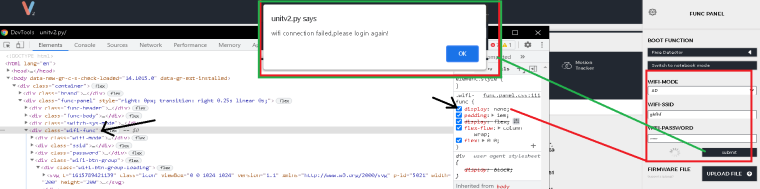
-
Here is the js file for the wifi button to connect....
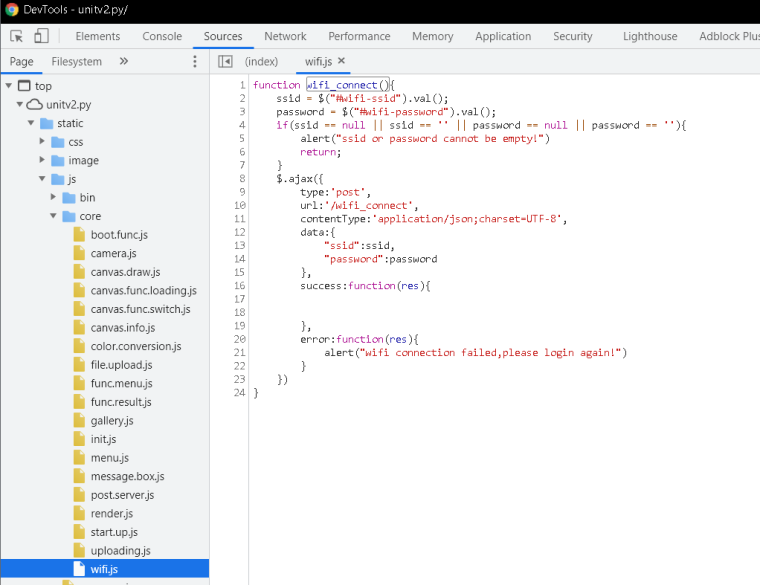
-
@m5stack Can you also reset the network configuration files in the firmware for next release?
Reset these files if modifieddhcpcd.conf
dnsmasq.conf
hostapd.conf
in /etc/ -
@asmodev thank you feedback , we will check it.

Hello! It looks like you're interested in this conversation, but you don't have an account yet.
Getting fed up of having to scroll through the same posts each visit? When you register for an account, you'll always come back to exactly where you were before, and choose to be notified of new replies (either via email, or push notification). You'll also be able to save bookmarks and upvote posts to show your appreciation to other community members.
With your input, this post could be even better 💗
Register Login