Tutorial: Using COM.LoRaWAN in UIFlow
-
@lasniko you could reuse some parts of the tutorial, but the older blue module uses completely different AT-commands.
-
thank you very much for this very valuable information for a beginner like me.
-
Great Tutorial,
please go on with it, would like to find an way to upload sensordata to TTN via ABP.
I have only an singleGateWay here and it does not let my join via OTAA.I am stuck here.
many greetins from danube/austria
holger -
Hello @sodoku. Many thanks for sharing the tutorial! I found it on m5stack.hackster.io and it helped me a lot. Registered two COM.LoRaWAN 868MHz modules sucessfully with TTN and managed to see uplinks (alas with long join latency and lots of retrying uplinks though I am in the very middle of Berlin - it seems coverage still has to improve a lot). I am still struggling with the adaption of the official P2P example. Especially regarding use with a sensor in a setup without use of buttons to initiate data requests. If you'd find the time to extend your tutorial his would be much appreciated.
Also I wonder about the real life range of the modules. I have currently set them to 5V and cannot pull data beyond 20m distance, line of sight. Seems odd ... what are your experiences? Can this be enhanced using 12V? Maybe a faulty antenna connection?
As a side note - all blocks in Flow 1.7.2 are dedicated to the older blue modules - but an implementation for the M031-C is in development, as confirmed by M5Stack support. -
@anvalin I am glad I could help. I haven't done an example with sensors yet, because M5Stack said they would release support to the module in UIFlow which would make my example obsolete. I might still do it if I find the time.
I think the input power doesn't matter since the 12V will be regulated down to 5V anyway. I am also in Berlin. With a simple P2P test and a TTGO board in my window I recieved packages about 400m away. My record though was getting a connection to an outdoor TTN gateway which is over 8km away!
LoRa works best with a line of sight, any buildings inbetween can significantly decrease the signal. -
@holgerw-0 didn't see your question. Did you manage to get it working?
I haven't used ABP so far, but you should be able to use it by setting the ABP settings from TTN:
AT+NwkSKey=kkkk
AT+AppSKey=kkkk
AT+DevAddr=kkkk
and then switching from OTAA to ABP:
AT+OTAA=0 -
Hi @sodoku
first COM.X LoraWan blocks became available with UI.Flow 1.7.5. Unfortunately still no support for the european frequency model.I now run a public TTN gateway myself covering a portion of the Gleisdreieck area filling a blind spot. Hopefully adding an external LoraWan antenna with higher gain will solve my range problem at my nodes location - half a kilometre distance in a dense urban area can really be a show stopper with LoraWan when there's no gateway around ;)
-
@anvalin glad you got something working. Your gateway is about 4km away from me. Not sure I will manage to get a connection to you :D
-
Hi @sodoku and thanks for the nice tutorial.
As @LasNiko , I plan to try the same :Using old blue LORAWAN Module (LORA868) to send data to TTN.
Would you have any insights on the commands to use by any chance ?
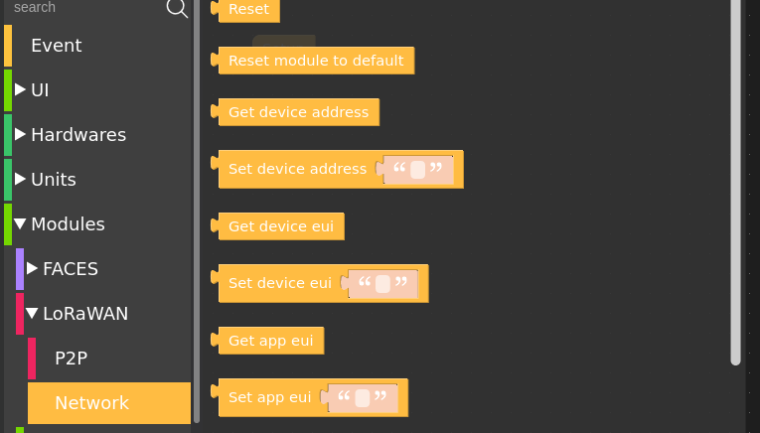
Blocks exists in UIFLOW 1.8.2 but hard to find documentations related to it
Cheers,
bob_isat
-
@anvalin said in Tutorial: Using COM.LoRaWAN in UIFlow:
Hello @sodoku. Many thanks for sharing the tutorial! I found it on m5stack.hackster.io and it helped me a lot. Registered two COM.LoRaWAN 868MHz modules sucessfully with TTN and managed to see uplinks (alas with long join latency and lots of retrying uplinks though I am in the very middle of Berlin - it seems coverage still has to improve a lot). I am still struggling with the adaption of the official P2P example. Especially regarding use with a sensor in a setup without use of buttons to initiate data requests. If you'd find the time to extend your tutorial his would be much appreciated.
Also I wonder about the real life range of the modules. I have currently set them to 5V and cannot pull data beyond 20m distance, line of sight. Seems odd ... what are your experiences? Can this be enhanced using 12V? Maybe a faulty antenna connection?
As a side note - all blocks in Flow 1.7.2 are dedicated to the older blue modules - but an implementation for the M031-C is in development, as confirmed by M5Stack support.Damned, i had the same expectation! (the 12V to enhance range)...
-
COM.LoRaWAN Module 868MHz V2.0 (ASR6501, product code MS03031-C4) is now listed at retailers. Hopefully this new module will finally see full UIFlow support.
-
No news for the COM.X 868 Modul in UIFlow. Still not in the UIFlow "Library".
Edit:
@sodoku, the COM.LORAWAN 868 (ASR6501, M031-C) modul has different "AT"-Commands and if i use these commands instead of yours in the description, i could communicate with the modul via Console and USB and can send "payloads" to TTN, but no chance to use some other "programming-blocks" in UIFlow. The AT-Command Introductions are here:



Hello! It looks like you're interested in this conversation, but you don't have an account yet.
Getting fed up of having to scroll through the same posts each visit? When you register for an account, you'll always come back to exactly where you were before, and choose to be notified of new replies (either via email, or push notification). You'll also be able to save bookmarks and upvote posts to show your appreciation to other community members.
With your input, this post could be even better 💗
Register Login