UIFlow - Trimming Strings
-
@notdodgy there is also replace block. It has a three arguments:
first is text to replace in your case [
second is a replacing text, in your case leave blank.
and third is your text or variable containing it. -
That is good to hear.
I started looking at a custom block but could find the right Python command.
string[n:n] does not work.
-
@robalstona said in UIFlow - Trimming Strings:
@notdodgy there is also replace block. It has a three arguments:
first is text to replace in your case [
second is a replacing text, in your case leave blank.
and third is your text or variable containing it.That is what I used but to only remove the first and last characters takes a number of search and replaces.
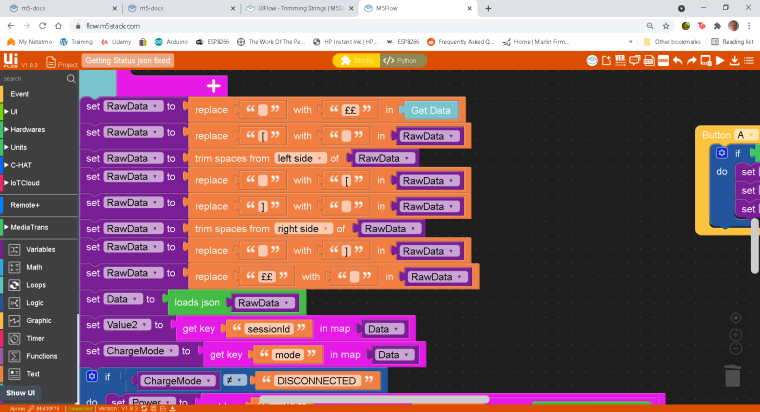
-
@notdodgy, show me example input string, and write what exactly you need "extract" from this json string. Show me what string you except as output according to example input string. It is a some kind of homework?. I don't know why you make so many character substitutions in the text.
in python code you could use this construction:
out_str = in_str.replace('[', '').replace(']', '').replace...but i dont tested yet how long may be replace chain.
-
@robalstona said in UIFlow - Trimming Strings:
@notdodgy, show me example input string, and write what exactly you need "extract" from this json string. Show me what string you except as output according to example input string. It is a some kind of homework?. I don't know why you make so many character substitutions in the text.
in python code you could use this construction:
out_str = in_str.replace('[', '').replace(']', '').replace...but i dont tested yet how long may be replace chain.
Hello. It's a simple problem but the work around is not.
This is a fairly large chunk of data which is json encoded.
It's provided from a server API which I cannot change.
It's from the servers that control my Car home charger.
I am creating a remote monitor as a simple visual display. I can also use it to do basic start/stop actions.It contains a number of [ and ] and spaces in the body which I need to keep unchanged.
My simple problem is it has an additional "[" at the start and a "]" at the end.
This extra pair of [ and ] stop "loads json" from working.I only need to lose the first and last characters of the received data, while keeping the rest unchanged.
In other programming languages it would be a substr(data,1,(strlen(data)-2)) or string[1:-1] . -
@notdodgy
In python this also worksout_str = in_str[1:-1]
-
I had tried that in a custom block but it didn't work.
Thanks for confirming the syntax.
I spotted that I had misread the custom block syntax rules and had included extra quotes.I now have a working custom block that simply removes the first and last characters.
I have an input called Trimmer
The code section has ${Trimmer}[1:-1]
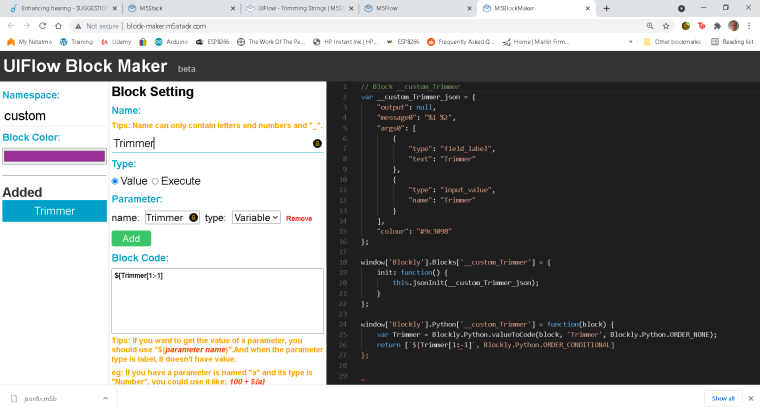
-
Try change name of function or variable. At now they had the same names.
Maybe this construction will be work
str(${Trimmer})[1:-1] -
@robalstona Thanks for your suggestion.
The Custom block builder creates the code and the code used in block shown above does work.
I opted to have the block and the name of the variable the same.
The variable name appears on the block so effectively names the block.
(If you don't have a variable as input, you can use a label, having both looked confusing and doubled the height of the block ). -
@iamliubo said in UIFlow - Trimming Strings:
Hi @notdodgy ,
We will add this block:

Hello -
Tried this new trim version and it works fine.
Guessed correctly that I needed to use "[ ]" as the trim characters in the first part.No need for me to use a custom trim function.
Thanks
Hello! It looks like you're interested in this conversation, but you don't have an account yet.
Getting fed up of having to scroll through the same posts each visit? When you register for an account, you'll always come back to exactly where you were before, and choose to be notified of new replies (either via email, or push notification). You'll also be able to save bookmarks and upvote posts to show your appreciation to other community members.
With your input, this post could be even better 💗
Register Login