🤖Have you ever tried Chat.M5Stack.com before asking??😎
    M5Stack Community
    • Categories
    • Recent
    • Tags
    • Popular
    • Users
    • Groups
    • Search
    • Register
    • Login

    [Solved]Unable to turn off when USB is Connected

    Scheduled Pinned Locked Moved Cores
    4 Posts 3 Posters 13.3k Views 1 Watching
    Loading More Posts
    • Oldest to Newest
    • Newest to Oldest
    • Most Votes
    Reply
    • Reply as topic
    Log in to reply
    This topic has been deleted. Only users with topic management privileges can see it.
    • yuriklebY Offline
      yurikleb
      last edited by m5-docs

      I'm unable to turn off the m5stack when a USB cable is connected.
      I want to reduce the charging time so it would be great to be able to keep the device off when connected to a charger. Is there no such option?

      1 Reply Last reply Reply Quote 0
      • RopR Offline
        Rop
        last edited by

        If you are using software that allows you to do so, you can turn off from software. In your own code, simply put m5.powerOFF();.

        yuriklebY 1 Reply Last reply Reply Quote 0
        • yuriklebY Offline
          yurikleb @Rop
          last edited by

          @rop cool thanks!
          Do you the python version of that line?
          Thanks!

          1 Reply Last reply Reply Quote 0
          • m5-docsM Offline
            m5-docs
            last edited by

            Hello

            You can put M5 to deep sleep using machine.deepsleep()

            similar to this.

            https://qiita.com/taka-murakami/items/0d2b4734b08516135d74
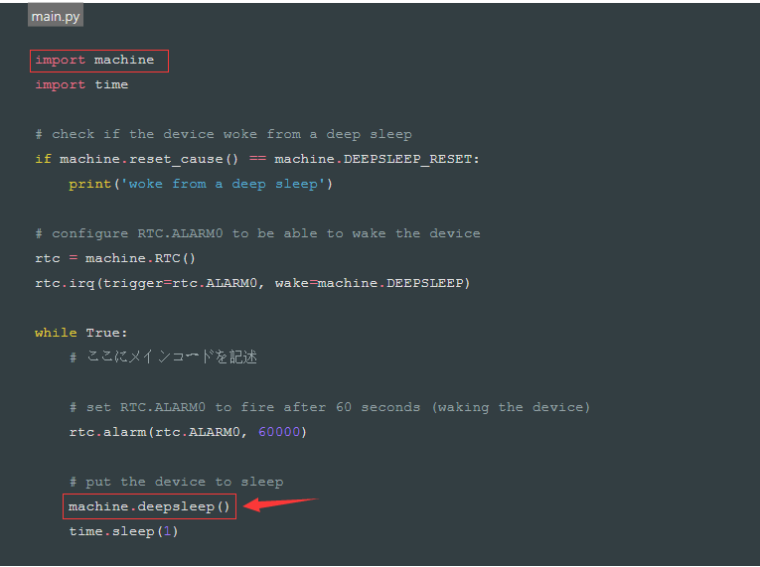
            0_1542614938118_TIM截图20181119160843.png

            M5Stack documentation URL

            https://docs.m5stack.com

            1 Reply Last reply Reply Quote 0

            Hello! It looks like you're interested in this conversation, but you don't have an account yet.

            Getting fed up of having to scroll through the same posts each visit? When you register for an account, you'll always come back to exactly where you were before, and choose to be notified of new replies (either via email, or push notification). You'll also be able to save bookmarks and upvote posts to show your appreciation to other community members.

            With your input, this post could be even better 💗

            Register Login
            • First post
              Last post