M5Dial TFT_eSPI pinout
-
Does anyone know the correct pin assignment for the M5Dial SPI bus? I am trying to run LVGL with TFT_eSPI. I have tried the pin assignments I obtained from the M5Dial specifications page but I am having no luck. Here is what I have so far
// For ESP32 Dev board (only tested with GC9A01 display)
// The hardware SPI can be mapped to any pins#define TFT_MOSI 5 // In some display driver board, it might be written as "SDA" and so on.
#define TFT_SCLK 6
#define TFT_CS 7 // Chip select control pin
#define TFT_DC 4 // Data Command control pin
#define TFT_RST 8 // Reset pin (could connect to Arduino RESET pin)
#define TFT_BL 9 // LED back-light -
Have you added the GC9A01 driver?
-
@ajb2k3 said in M5Dial TFT_eSPI pinout:
GC9A01 driver
Hmm, no I did not. Let me do some research and try to find the driver
-
Can any one get this simple GC9A01 test to run on the M5Dial
My goal is to have LVGL running on the M5Dial so I am working my way through the display issues at this time.
-
This is the Micropython code I used to get a basic "Hello World" working.
import os, sys, io import M5 from M5 import * label0 = None def setup(): global label0 M5.begin() label0 = Widgets.Label("label", 50, 100, 1.0, 0xffffff, 0x222222, Widgets.FONTS.DejaVu18) label0.setCursor(x=50, y=100) label0.setText(str('Hello World')) label0.setVisible(True) def loop(): global label0 M5.update() if __name__ == '__main__': try: setup() while True: loop() except (Exception, KeyboardInterrupt) as e: try: from utility import print_error_msg print_error_msg(e) except ImportError: print("please update to latest firmware”) -
-
-
@felmue, thanks very much, This worked perfectly.
-
@gordsh Hi ,
did you get this working ?
I am banging my head against the wall with this one right now ,
I am trying to use EEZ Studio with M5dial and using platform.io (or arduino ide whichever works)also if you have the file of user_setup.h for GC9A01. kindly share
Thank You -
@mukul_100_ Got this workking by using m5unified instead of tft_espi
But i can get the touch to work
as per what i read lvgl uses polling to get the touch coordinates using lv_timer_handler();but i dont understand how to implement M5Dial.Touch.getDetail(); to get the touch
-
@mukul_100_ I did get this working, I am having a different issue now but I will send you a small demo program that I wrote using LVGL with touch.
-
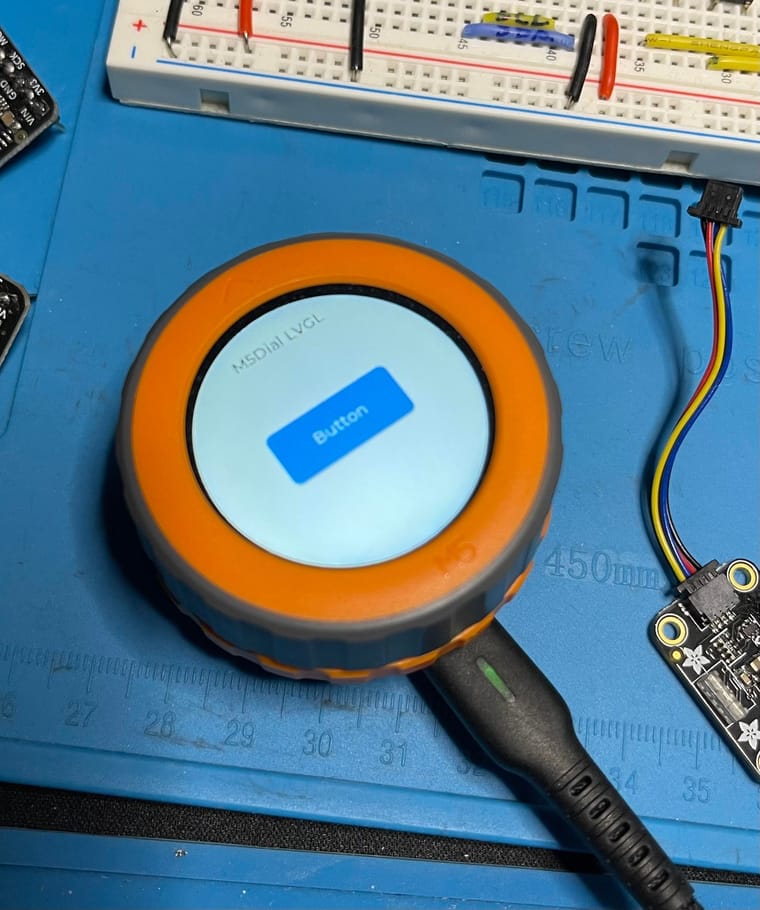
@mukul_100_ Here is a small demo of the M5Dial with touch and LVGL. Hope this helps and sorry for the delay.
-
@gordsh Oh great thanks a lot, I actually got it working,
and after seeing your code i tried to implement the button part with encoder but the dial seems to crash repeatedly because of it. For now that is not my focus so i will try it again later.
Also , do you have any idea how the implementation of encoder is eez studio is.
i understood that the group is to be made but didnt quite understand how to append/impelment the encoder events to it
If anyone has any idea or reference, Thank you in advance.also this is the code for how i implemented the button press with encoder
// Encoder read function void encoder_read(lv_indev_drv_t *drv, lv_indev_data_t *data) { long newPosition = M5Dial.Encoder.read() / 4; // Normalize encoder position if (newPosition != oldPosition) { int encoderDiff = newPosition - oldPosition; oldPosition = newPosition; // React to encoder rotation if (encoderDiff > 0) { lv_group_focus_next(group); } else if (encoderDiff < 0) { lv_group_focus_prev(group); } } // Check button press if (M5Dial.BtnA.wasPressed()) { data->state = LV_INDEV_STATE_PR; Serial.println("M5.BtnA Pressed"); } else { data->state = LV_INDEV_STATE_REL; } } // Display flush function void my_disp_flush(lv_disp_drv_t *disp, const lv_area_t *area, lv_color_t *color_p) { uint32_t width = (area->x2 - area->x1 + 1); uint32_t height = (area->y2 - area->y1 + 1); M5.Display.startWrite(); M5.Display.setAddrWindow(area->x1, area->y1, width, height); M5.Display.pushPixels((uint16_t *)&color_p->full, width * height, true); M5.Display.endWrite(); lv_disp_flush_ready(disp); } void setup() { auto cfg = M5.config(); M5Dial.begin(cfg, true, false); Serial.begin(115200); // LVGL initialization lv_init(); lv_disp_draw_buf_init(&drawBuffer, buffer, NULL, SCREEN_WIDTH * SCREEN_HEIGHT / 10); static lv_disp_drv_t disp_drv; lv_disp_drv_init(&disp_drv); disp_drv.hor_res = SCREEN_WIDTH; disp_drv.ver_res = SCREEN_HEIGHT; disp_drv.flush_cb = my_disp_flush; disp_drv.draw_buf = &drawBuffer; lv_disp_drv_register(&disp_drv); static lv_indev_drv_t encoder_drv; lv_indev_drv_init(&encoder_drv); encoder_drv.type = LV_INDEV_TYPE_ENCODER; encoder_drv.read_cb = encoder_read; encoder_indev = lv_indev_drv_register(&encoder_drv); // Create a group and assign it to the encoder input device group = lv_group_create(); lv_indev_set_group(encoder_indev, group); // Create focusable widgets lv_obj_t *btn1 = lv_btn_create(lv_scr_act()); lv_obj_align(btn1, LV_ALIGN_CENTER, -60, 0); lv_obj_t *label1 = lv_label_create(btn1); lv_label_set_text(label1, "Button 1"); lv_obj_t *btn2 = lv_btn_create(lv_scr_act()); lv_obj_align(btn2, LV_ALIGN_CENTER, 60, 0); lv_obj_t *label2 = lv_label_create(btn2); lv_label_set_text(label2, "Button 2"); lv_obj_t *btn3 = lv_btn_create(lv_scr_act()); lv_obj_align(btn3, LV_ALIGN_CENTER, 0, 50); lv_obj_t *label3 = lv_label_create(btn3); lv_label_set_text(label3, "Button 3"); // Add widgets to the group lv_group_add_obj(group, btn1); lv_group_add_obj(group, btn2); lv_group_add_obj(group, btn3); } -
@gordsh thanks for sending, I actually don't know eez studio at all, I have never used it..
-
@gordsh in your code, is the press function working successfully?
i am getting crashes for now, i am trying to use the button as a external button and not as a encoder button, the main problems seems to be init of button -
@gordsh Do you think with the lvgl m5dial setup , that Squareline Studio is usable ?
-
@SadE54 I believe it is.


Hello! It looks like you're interested in this conversation, but you don't have an account yet.
Getting fed up of having to scroll through the same posts each visit? When you register for an account, you'll always come back to exactly where you were before, and choose to be notified of new replies (either via email, or push notification). You'll also be able to save bookmarks and upvote posts to show your appreciation to other community members.
With your input, this post could be even better 💗
Register Login