質問:Digi-Clockモジュールの3桁目・4桁目表示方法について
-
タイトル
Digi-Clockモジュールの3桁目・4桁目表示方法について
詳しい状況の説明
初めまして。
UIFlow2.0にて、Digi-Clockモジュールの3桁目・4桁目に1文字ずつ表示(Write Character)する方法がわかりません。
1文字目・2文字目は問題なく表示出来ます。また、文字列としての表示(Write String)も問題ありません。Write Characterの表示位置指定は0~4までしか無いため、3桁目、4桁めは手動で5、7をそれぞれ指定しています。
添付のUIflowの場合、12:__表示の2秒後、34:__と言う表示になります。(1桁目、2桁目のみが更新され、3桁目、4桁目は消灯のまま変化なし)毎回文字列を生成したうえでwrite stringによる表示としても良いのですが、更新時のちらつきを極力抑えたいため、write characterによる各桁個別の表示更新をしたいと考えています。
このような使い方の経験がある方がおられましたらアドバイス頂ければと思います。
使用しているUIFlowやArduinoライブラリのバージョン
- UIflow 2.1.1
- AtomS3 Lite
- Digi-Clock
再現可能なコード
import os, sys, io
import M5
from M5 import *
from hardware import *
from unit import DigiClockUnit
import time


timer0 = None
i2c0 = None
digiclock_0 = None
digiclock_1 = None


temp = None


def timer0_cb(t):
  global timer0, i2c0, digiclock_0, digiclock_1, temp
  pass

def setup():
  global timer0, i2c0, digiclock_0, digiclock_1, temp

  M5.begin()
  timer0 = Timer(0)
  i2c0 = I2C(0, scl=Pin(1), sda=Pin(2), freq=100000)
  digiclock_0 = DigiClockUnit(i2c0, 0x30)
  digiclock_0.clear()
  digiclock_0.set_char('1', 0)
  digiclock_0.set_char('2', 2)
  digiclock_0.set_char(':', 4)
  time.sleep(2)
  digiclock_0.set_char('3', 5)
  digiclock_0.set_char('4', 7)


def loop():
  global timer0, i2c0, digiclock_0, digiclock_1, temp
  M5.update()


if __name__ == '__main__':
  try:
    setup()
    while True:
      loop()
  except (Exception, KeyboardInterrupt) as e:
    try:
      from utility import print_error_msg
      print_error_msg(e)
    except ImportError:
      print("please update to latest firmware")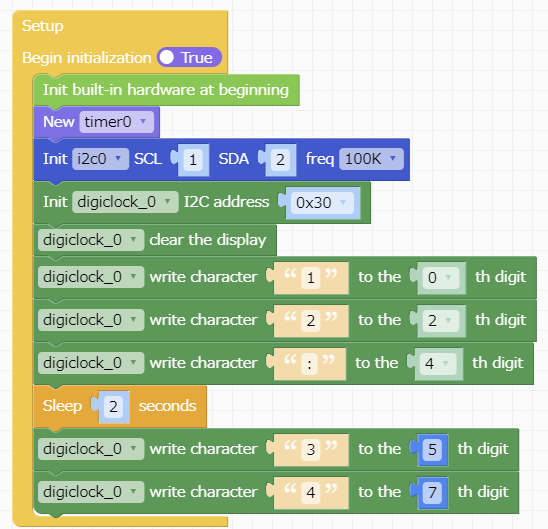
-
ymd_mさん、はじめまして
Digi-Clockを持っていないのですが、興味があったので、もし可能であれば逆にご教示いただきたく投稿しています。もし、次の画像のようなフローを実行したら、どのような動作になるでしょうか。
公式ドキュメント「Digi-Clock」
https://docs.m5stack.com/ja/unit/digi_clock
に書かれている「I2Cレジスタ表」を見ると、12:34表示の2秒後に34とだけ表示されるのではないかと思うのですが。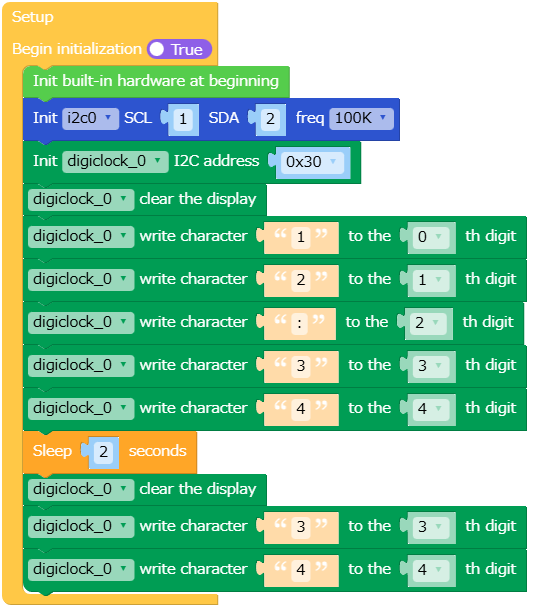
もしご迷惑でなければご教示いただけるとうれしいです。
どうぞよろしくお願いいたします。kimurer
-
@kimurer さん
コメント頂きありがとうございました。ご教示頂きました方法で試してみたのですが、1桁目に"1"が表示されるのみとなりました。
当初私もコメント頂いた方法で試してみたのですが上手くいかず、試行錯誤の結果とりあえず2桁目までは表示できたのですが・・・と言った感じです。
生データの表示コマンド等もあるのでもう少し試行錯誤してみようと思います。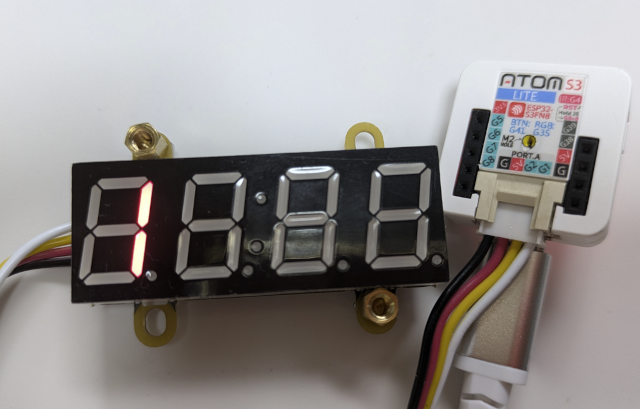
ありがとうございました。
-
生データ表示(Write RAW Data)にて上手くいきましたのでご報告です。
下記の内容で無事期待通りの動作をしてくれました。
テスト動画(imgur)
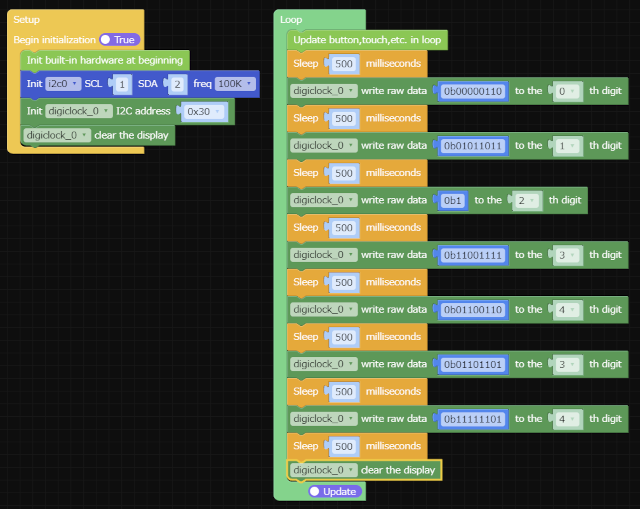
もしかしたらWrite Characterのバグ?の可能性があるかもしれません。
ありがとうございました。
-
@ymd_m さん
貴重な情報をご教示くださいまして、ありがとうございます。
Write RAW DataとWrite Characterの動作の違いをみると、おっしゃるとおりバグのように感じます。
ファームウェアアップデートに期待です。UIFlow2、すごく扱いやすくて好きなのですが、ここだけの話、M5-Docsの情報も不足気味ですし、例えばセンサーの値をlabelに表示させる際、「整数に変換」を使ってもときどき小数点以下の値まで表示されるし…ところどころ、微妙に残念ポイントがある気がします。
Hello! It looks like you're interested in this conversation, but you don't have an account yet.
Getting fed up of having to scroll through the same posts each visit? When you register for an account, you'll always come back to exactly where you were before, and choose to be notified of new replies (either via email, or push notification). You'll also be able to save bookmarks and upvote posts to show your appreciation to other community members.
With your input, this post could be even better 💗
Register Login