problem with m5stack (with mpu9250)
-
i , there are problems with m5stack. When connected to a PC(win 10), the device is not defined
-
You must install the CP210X usb drivers for windows to recognize the device:
- install drivers.
- reboot.
- connect the usb cable.
Drivers are available on the website, download button on the upper bar, last link at the bottom.
-
@anichang 在 problem with m5stack (with mpu9250) 中说:
reboot.
this does not help, the drivers are installed, another usb cable is purchased, the PC can not see at all its -
maybe u try another use cable or plug deeper?
-
I am using M5Stack with Windows 10 - 64 bit on 3 different systems and M5Stack works fine on all. No issues.
On one machine originally the drivers did not install correctly - though it wasn't obvious at the time.
To check driver installation worked correctly:
- Dis-connect M5Stack from PC if connected. Turn up PC volume. Open device manager. Connect M5Stack using USB cable.... once M5Stack is connected, you should hear a Windows sound - "bing""- and now in the device manager a new item should magically appear called "Ports” Click on it – it should show the Silicon Labs driver listed.
If not , you need to re-install the driver - make sure Python is on your Windows path. You can verify the path is working by opening command prompt and typing - python.
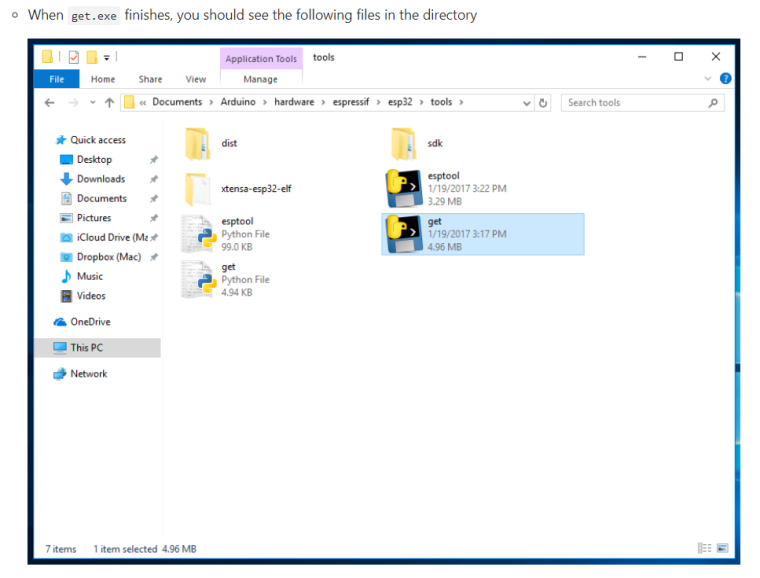
Are these files (below) available after you have Python installed and after you run get.exe ? They should be.

Hello! It looks like you're interested in this conversation, but you don't have an account yet.
Getting fed up of having to scroll through the same posts each visit? When you register for an account, you'll always come back to exactly where you were before, and choose to be notified of new replies (either via email, or push notification). You'll also be able to save bookmarks and upvote posts to show your appreciation to other community members.
With your input, this post could be even better 💗
Register Login