Core Basic v2.7 not shown in IDE
-
Hello,
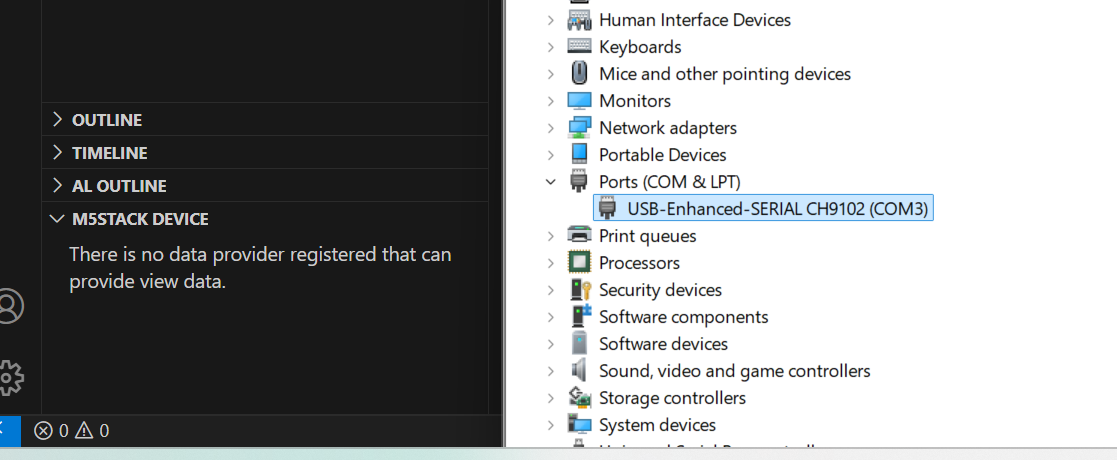
I hava a Core Basic v2.7 with UIFlow v1.14.2 installed on it and set to USB mode. The "CH9102_VCP_SER_Windows" drivers are shown under Windows 11 and the device is recognized when plugged in.

But when I try to conect with the MU IDE or VS Code no device is detected. I have tried it on 3 separate devices and run in the sam problem. The same issue with my Stick C Plus 2.
Any one an idea what I am doing wrong?
Cheers Philipp
-
is it detected by M5Burner or/and Arduino?
-
@robski yes Burner is dedecting it and I can burn the software on it. This is why I don't understand the problem.
-
@pleister M5Stack devices added to VSCode?
-
@robski it is not showing in VS Code. First I thougt that it was a problem of VS Code, that is why I tried it with MU.
-
@pleister uninstall and install M5Stack extension maybe?
-
@robski did that, same problem. I tried it on a new installed windows with a new USB-cable with the same outcome. Do I miss something
- Install diver
- Burn device
- Install VS code with vscode-m5stack-mpy extension
than it should work right?
-
@pleister if M5Burner, Arduino, Uiflow2 are happy with your contoroller then cable is ok, driver is ok..
..something isn't right with VS Code config -
@robski but what can I configure in VS Code, I dont see anything to set up?
-
@pleister found the solution in rebuilding the extension https://github.com/curdeveryday/vscode-m5stack-mpy/issues/45

Hello! It looks like you're interested in this conversation, but you don't have an account yet.
Getting fed up of having to scroll through the same posts each visit? When you register for an account, you'll always come back to exactly where you were before, and choose to be notified of new replies (either via email, or push notification). You'll also be able to save bookmarks and upvote posts to show your appreciation to other community members.
With your input, this post could be even better 💗
Register Login