M5StickC, UIFlow, Play Tone or Speaker.beep - how to add silence
-
I'm testing out the speaker hat on my newly acquired M5StickC. I wrote a program which does other things but when I push Button B, I want it to play the first 6 notes of the Mario song. I tried both the Play Tone and Speaker.beep functions but they both do the same thing. Even though I'm specifying the first 3 notes, it is being played as if it were one note. I put wait time between with no effect. I need some separation between the notes. I need staccato, not legato :) Also, the end note continues to play, even after it exits this module. Here's what I did (shown in Python):
def buttonB_wasPressed():
global q, i, bv, iv
hat_spk1.tone(329, 200)
wait_ms(200)
hat_spk1.tone(329, 200)
wait_ms(200)
hat_spk1.tone(329, 200)
wait_ms(200)
hat_spk1.tone(523, 200)
wait_ms(200)
hat_spk1.tone(329, 200)
wait_ms(200)
hat_spk1.tone(784, 200)
wait_ms(200)
pass
btnB.wasPressed(buttonB_wasPressed -
Can you post a screen shot of your program.
Are you using the Button loop?
-

-
@happy-hippo
I made a better sounding one; however, it seems like the speaker.beep function is not paying any attention to the duration. Like I said, the first 3 notes sound as one.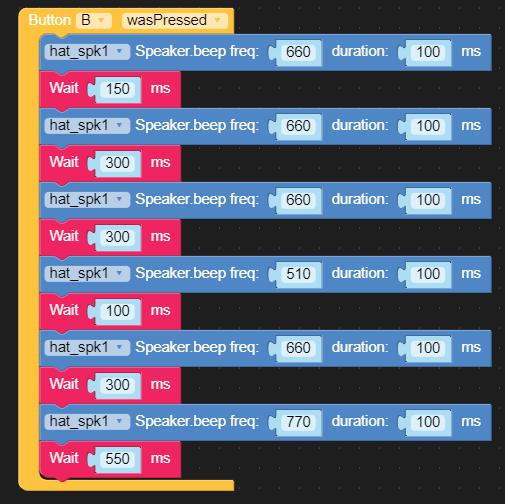
-
@happy-hippo
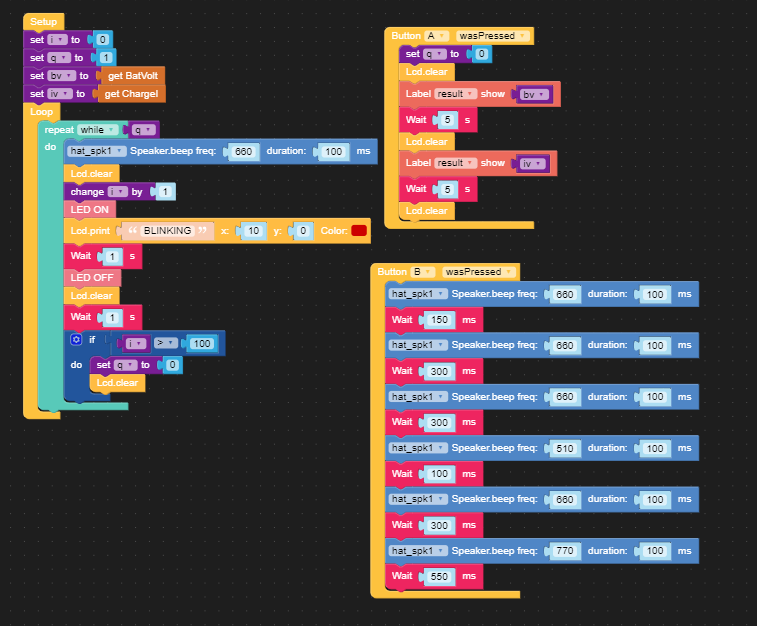
Here is the entire code I've been playing around with. Basically, I'm flashing the LED for 100 times. There is supposed to be a beep at the beginning of each flash. That is not happening. If I push Button A, the battery voltage and current displays. That is working. If I push Button B, the first 6 notes of Mario plays. That sort of works, except there is no separation between notes. And the last note plays forever. I know this is super basic but I've just starting using this.I can run this in Arduino IDE with no problem; however, that doesn't help me learning UIFlow.
-
@happy-hippo Music is not properly implemented in UIFlow and the walkaround for it is a bit complicated. but in essence I had to create variable for beats and DPM and then tie them all together.
Unfortunately I seam to have misplaced the timing demo.

Hello! It looks like you're interested in this conversation, but you don't have an account yet.
Getting fed up of having to scroll through the same posts each visit? When you register for an account, you'll always come back to exactly where you were before, and choose to be notified of new replies (either via email, or push notification). You'll also be able to save bookmarks and upvote posts to show your appreciation to other community members.
With your input, this post could be even better 💗
Register Login