-
i have an M5core too but mqtt is not working yet
-
@dvd78 Update firmware to 1.1.1 to get MQTT working.
-
@ajb2k3 said in MQTT UIFlow problems:
@dvd78 Update firmware to 1.1.1 to get MQTT working.
i did it yesterday, do i need to download a new version?
-
@dvd78 Sorry, yesterday our engineers forgot to update....
now, already fixed, refresh web page it will be ok -
MQTT working good for me now with both of my grey and fire m5stack cores. I have tested cloudmqtt and io.adafruit. Thanks for fixing it!
-
@heybin thank you, problem is solved.
bye
-
I tried the same blocky today. It uploaded but on the display I only see: error ImportError('mqtt need download...'.)
I am using an M5Stack Fire, firmware 1.1.2.
I have a local MQTT broker running on an Onio Omega and the upload is done with a Windows 10 computer.Any help would be appreciated.
-
Instead of running the program directly from uiFlow (which is the triangle button at the top-right), just click the Download option from the hamburger menu.
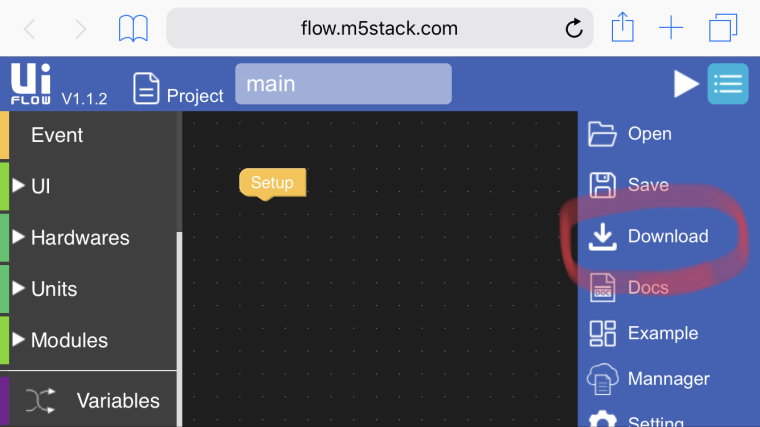
-
Thanks! That worked.
Just out of curiosity: What's the difference between the two? -
@the_stacker said in MQTT UIFlow problems:
Thanks! That worked.
Just out of curiosity: What's the difference between the two?Run is just for quick testing of your program. It is erased on a reboot. Download will add the program to the flash storage on the device so you can access it from the APP.LIST menu (middle button when the M5stack is booting up - inbeteeen upload and setup).


Hello! It looks like you're interested in this conversation, but you don't have an account yet.
Getting fed up of having to scroll through the same posts each visit? When you register for an account, you'll always come back to exactly where you were before, and choose to be notified of new replies (either via email, or push notification). You'll also be able to save bookmarks and upvote posts to show your appreciation to other community members.
With your input, this post could be even better 💗
Register Login