🤖Have you ever tried Chat.M5Stack.com before asking??😎
    M5Stack Community
    • Categories
    • Recent
    • Tags
    • Popular
    • Users
    • Groups
    • Search
    • Register
    • Login

    Treat color as a variable?

    Scheduled Pinned Locked Moved UIFlow
    4 Posts 2 Posters 7.0k Views
    Loading More Posts
    • Oldest to Newest
    • Newest to Oldest
    • Most Votes
    Reply
    • Reply as topic
    Log in to reply
    This topic has been deleted. Only users with topic management privileges can see it.
    • P Offline
      Phi
      last edited by

      I was thinking of a project to teach my nephew programming, and wanted to pick a random color from a list by name, but none of the the blocks in Graphic or Screen treat color as a variable.

      I did find this old feature suggestion in the forum, which is how I would expect it to work, given a presumed "set variable to RGB values" block...

      RE: UiFlow interface suggestions

      Is there some other way I am missing?

      1 Reply Last reply Reply Quote 0
      • ajb2k3A Offline
        ajb2k3
        last edited by

        I just checked and if you look at the attached image: 0_1627631253447_Screenshot 2021-07-30 at 08.47.14.png
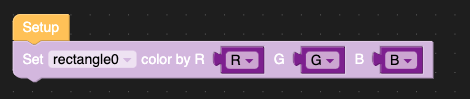
        It is possible to set variable for the individual colours on a numerical value.

        UIFlow, so easy an adult can learn it!
        If I don't know it, be patient!
        I've ether not learned it or am too drunk to remember it!
        Author of the WIP UIFlow Handbook!
        M5Black, Go, Stick, Core2, and so much more it cant be fit in here!

        1 Reply Last reply Reply Quote 0
        • P Offline
          Phi
          last edited by

          Yes, but that only works if you drag a line to the screen and manually pre-define the placement and dimensions. You can then alter those later, but it's just the one line.

          I want to programmatically draw multiple lines (via LCD.line) with random color(s) and there does not seem to be a Blockly way to achieve that (I'd prefer not to delve into executing Python code for this...)

          1 Reply Last reply Reply Quote 0
          • ajb2k3A Offline
            ajb2k3
            last edited by ajb2k3

            Ahh I see.
            No, that just the way the blockly GUI options work in that you have to drag the UI element to the virtual screen to access the functions.
            Have you considered
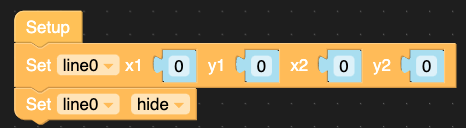
            0_1627716155995_Screenshot 2021-07-31 at 08.21.26.png

            Which then creates a hidden placeholder line which then give you access to the functions?
            and then you create a function to create a line with a random colour.
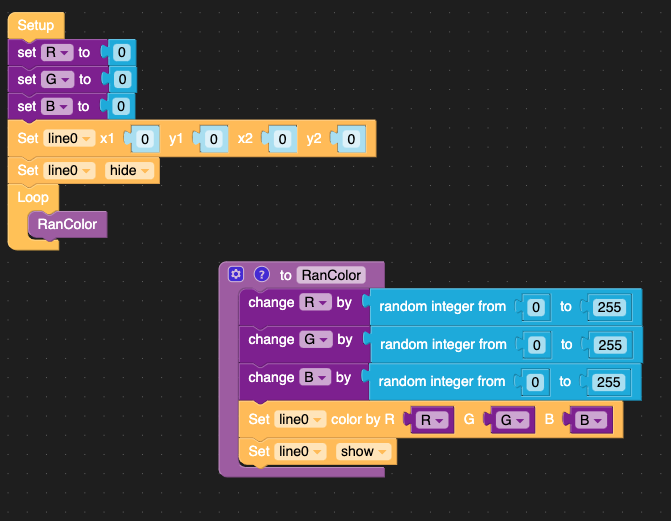
            0_1627716826585_Screenshot 2021-07-31 at 08.33.25.png

            Edit Ahh I see, UI line and lcd line have different color functions

            UIFlow, so easy an adult can learn it!
            If I don't know it, be patient!
            I've ether not learned it or am too drunk to remember it!
            Author of the WIP UIFlow Handbook!
            M5Black, Go, Stick, Core2, and so much more it cant be fit in here!

            1 Reply Last reply Reply Quote 0

            Hello! It looks like you're interested in this conversation, but you don't have an account yet.

            Getting fed up of having to scroll through the same posts each visit? When you register for an account, you'll always come back to exactly where you were before, and choose to be notified of new replies (either via email, or push notification). You'll also be able to save bookmarks and upvote posts to show your appreciation to other community members.

            With your input, this post could be even better 💗

            Register Login
            • First post
              Last post