🤖Have you ever tried Chat.M5Stack.com before asking??😎
    M5Stack Community
    • Categories
    • Recent
    • Tags
    • Popular
    • Users
    • Groups
    • Search
    • Register
    • Login

    M5StickC-Plus Buzzer not working

    Scheduled Pinned Locked Moved Arduino
    10 Posts 7 Posters 17.0k Views 1 Watching
    Loading More Posts
    • Oldest to Newest
    • Newest to Oldest
    • Most Votes
    Reply
    • Reply as topic
    Log in to reply
    This topic has been deleted. Only users with topic management privileges can see it.
    • _ Offline
      _Rob
      last edited by

      I have several M5StickC-Plus's but I cannot seem to get the buzzer to work. The factory test has code in it to use the buzzer on button press but it does not seem to work. Can someone point me to code to make this buzzer work?
      Thanks.

      1 Reply Last reply Reply Quote 0
      • m5stackM Online
        m5stack
        last edited by

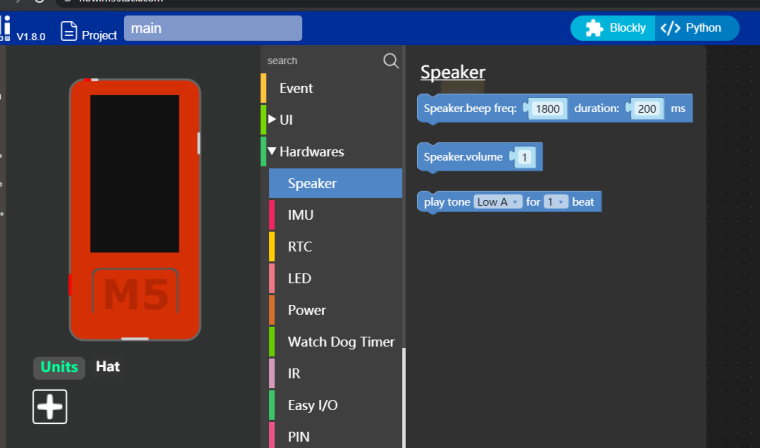
        try to use UIFlow for the test

        0_1626421855736_936b7dd7-028c-4e19-a76a-11936f706c5e-image.png

        1 Reply Last reply Reply Quote 0
        • _ Offline
          _Rob
          last edited by

          I have not used uiflow before but tried to get it running to test this. I was unable to get uiflow working on my windows 10 system.
          Please provide an arduino C example.

          1 Reply Last reply Reply Quote 0
          • W Offline
            Wilfried
            last edited by

            On my two M5StickC-Plus the Buzzer is also not working. Please provide an Arduino example.

            M W 2 Replies Last reply Reply Quote 0
            • R Offline
              Rob 0
              last edited by

              The default volume is very low and probably only audible to young bats :)

              1 Reply Last reply Reply Quote 0
              • M Offline
                macsbug @Wilfried
                last edited by macsbug

                Hello @wilfried

                Arduino example:
                https://101010.fun/iot/m5stickc-plus-firststep.html

                teastainT 1 Reply Last reply Reply Quote 0
                • teastainT Offline
                  teastain @macsbug
                  last edited by

                  @macsbug Still very faint!
                  Not useable!

                  Cheers, Terry!

                  100% M5Stack addict with several drawers full of product!

                  1 Reply Last reply Reply Quote 0
                  • W Offline
                    wsanders
                    last edited by wsanders

                    I'm not sure what is connected to it, probably some tiny piezo speaker, but pin G2 is the "buzzer" pin.

                    There is a way to set up PWM on a pin at a desired frequency. Also, sometimes these speakers are resonant, so much louder at a particular frequency.

                    Example using the API, below:

                    1 Reply Last reply Reply Quote 0
                    • W Offline
                      wsanders
                      last edited by wsanders

                      Using //https://101010.fun/iot/m5stickc-plus-firststep.html
                      for inspiration, we can upload this program:

                      #include <M5StickCPlus.h>

                      void setup() {
                      M5.begin();
                      M5.Lcd.setTextSize(3);
                      M5.Lcd.setRotation(3);
                      M5.Lcd.setTextColor(TFT_ORANGE);
                      }

                      void loop() {
                      M5.update();
                      soundTest();
                      }

                      void soundTest() {
                      for (int tone=100; tone < 4000; tone=tone+50) {
                      M5.Lcd.fillScreen(BLACK);
                      M5.Lcd.setCursor(80, 50);
                      M5.Lcd.printf("%d", tone);
                      M5.Beep.tone(tone);
                      M5.Beep.update();
                      delay(200);
                      }
                      }

                      According to my ears there is a definite peak about 2500 Hz, with frequencies under 250 Hz and over 3000 not audible. Your ears may vary .....

                      1 Reply Last reply Reply Quote 1
                      • W Offline
                        Wilfried @Wilfried
                        last edited by

                        @wilfried Ok, that workrd. ThankYou

                        1 Reply Last reply Reply Quote 0

                        Hello! It looks like you're interested in this conversation, but you don't have an account yet.

                        Getting fed up of having to scroll through the same posts each visit? When you register for an account, you'll always come back to exactly where you were before, and choose to be notified of new replies (either via email, or push notification). You'll also be able to save bookmarks and upvote posts to show your appreciation to other community members.

                        With your input, this post could be even better 💗

                        Register Login
                        • First post
                          Last post