WiFi AP Connectivity UIFlow V2.0.0
-
Hello,
I am creating an app on a Core 2 device which requires Internet connectivity and using UIFlow V2.0.0 (Aplha-28). I cannot figure out how to connect to my WiFi network. In older versions of UIFlow, there apparently were "Network" functions, which had a connect to WiFi function. In Alpha-28, there are "WLAN AP" functions however, I have tried setting SSID and password, followed by "INIT WLAN AP" and I cannot seem to successfully compile and get my program working. I must be doing something incorrectly.
Are there documents, tutorials and/or samples for UIFlow 2.0.0? Would I be better off using Arduino tools and direct coding?
Thank you
-
You should init the WLAN AP first, then connect.
But I am having a similar problem. When connected via USB, everything works great. When I run the same program without USB connected, I get a wifi oserror, and attempts to have my StickC+ talk to my desktop via MQTT don't work at all. It won't even load the Widgets to set screen parameters on the StickC+. It's like the Wifi connection is only allowed to work for UIflow??
-
@bergkatse Thank you for your reply, it sent me in the right direction. I will admit, this platform does not have the best documentation. Items such as this require hit-and-miss troubleshooting. I have experienced strange initialization issues with other sensors and simply moving the block of initialization code resolved the issue.
I was able to get around WiFi INIT issue based on your suggestion however, I am unable to connect to my WiFi network. I'll keep trying and if I'm successful, I'll try connecting while not connected to USB to see if I experience the same issue as you are having.
Thank you
-
@bergkatse I managed to resolve some of the issues that I was having and, implemented MQTT into my Core 2 monitoring. I stuck with UIFlow for this initial application to see how capable it was. It's not too bad however, I believe I will move to the Arduino IDE for more control. Here is the M5Stack Core 2 app that I created for your reference:
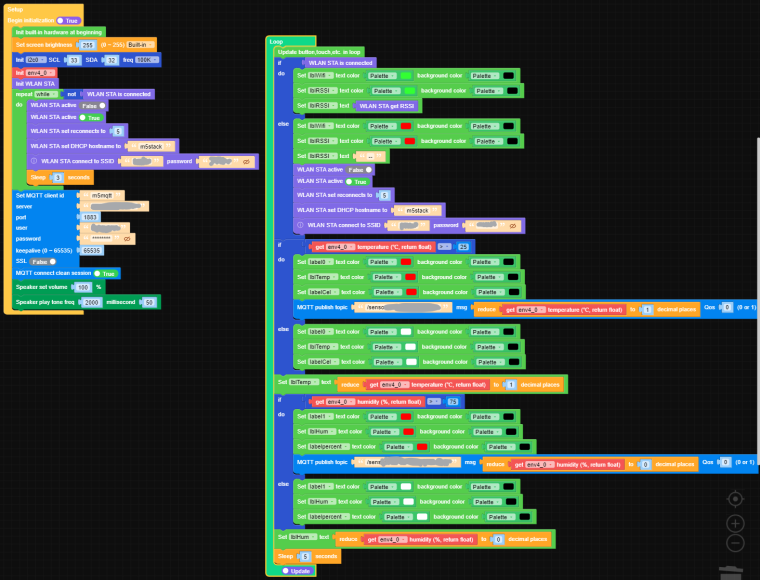
I'm note sure if I implemented the WLAN functionality properly however, it works under all conditions. For example, if I exit the area of WiFi coverage, the connection resumes when I get back into range.
Thank you

Hello! It looks like you're interested in this conversation, but you don't have an account yet.
Getting fed up of having to scroll through the same posts each visit? When you register for an account, you'll always come back to exactly where you were before, and choose to be notified of new replies (either via email, or push notification). You'll also be able to save bookmarks and upvote posts to show your appreciation to other community members.
With your input, this post could be even better 💗
Register Login