UiFlow 2.0 Graphics
-
In UiFlow line graph is created using Lcd.line. How to create a line graph in UiFlow 2.0 ?
-
line0 = Widgets.Line(192, 73, 242, 73, 0xffffff)
-
More generally, if you what to know the python-code just use the UIFlow Website as API reference/resource. Simply construct your desired function etc with UIFlow-blocks and then to see the associated python code use "split view" like shown here:
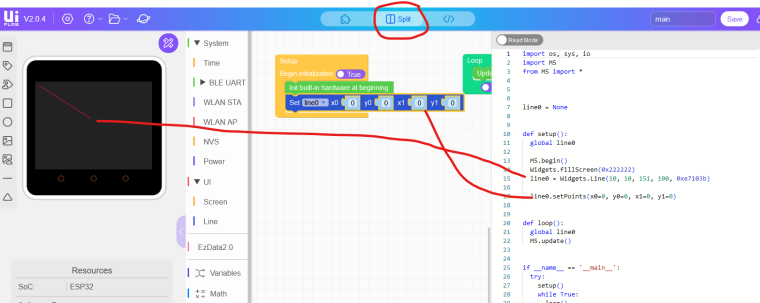
-
How to execute lcd.clear in UiFlow 2.0 ?
-
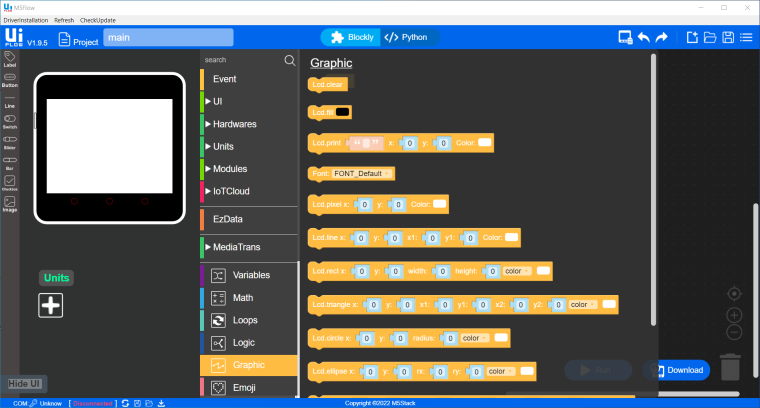
Is there an analogue to this in UiFlow 2.0 ? -
Did you have a look in UIFlow 2.0 your self?
-
Yes
-
I dont think I found an api for screen clear in UIFlow2
-
Hello guys
how about just filling the screen all black? E.g.
Widgets.fillScreen(0x000000)Thanks
Felix -
This post is deleted! -
Got it figured out! Added an Image and the Lines began to appear. Thanks to everyone who tried to help.


Hello! It looks like you're interested in this conversation, but you don't have an account yet.
Getting fed up of having to scroll through the same posts each visit? When you register for an account, you'll always come back to exactly where you were before, and choose to be notified of new replies (either via email, or push notification). You'll also be able to save bookmarks and upvote posts to show your appreciation to other community members.
With your input, this post could be even better 💗
Register Login