🤖Have you ever tried Chat.M5Stack.com before asking??😎
    M5Stack Community
    • Categories
    • Recent
    • Tags
    • Popular
    • Users
    • Groups
    • Search
    • Register
    • Login

    MQTT and Ui.Flow help needed

    Scheduled Pinned Locked Moved UIFlow
    11 Posts 4 Posters 25.4k Views 2 Watching
    Loading More Posts
    • Oldest to Newest
    • Newest to Oldest
    • Most Votes
    Reply
    • Reply as topic
    Log in to reply
    This topic has been deleted. Only users with topic management privileges can see it.
    • H Offline
      hetzer
      last edited by

      I had the same issue with io.adafruit.com but my code works with CloudMQTT.

      f3rn4nd0dF 1 Reply Last reply Reply Quote 0
      • f3rn4nd0dF Offline
        f3rn4nd0d @hetzer
        last edited by

        @hetzer Thanks, but I need it to work with Adafruit io :(

        1 Reply Last reply Reply Quote 0
        • world101W Offline
          world101
          last edited by

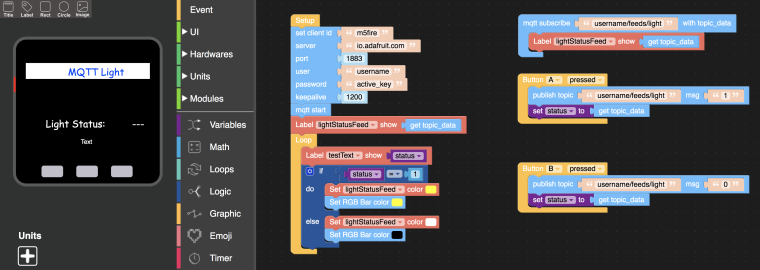
          This one worked for me in the past. The username and active_key can be found on the "View AIO Key" link on io.adafruit.com. Make sure you have a feed named "light" set up under Feeds.
          0_1554257381294_Screen Shot 2019-04-02 at 10.09.13 PM.png

          1 Reply Last reply Reply Quote 1
          • world101W Offline
            world101 @f3rn4nd0d
            last edited by

            @f3rn4nd0d try changing the mqtt subscribe to username/feeds/parking but replace your username with the real one

            f3rn4nd0dF 1 Reply Last reply Reply Quote 1
            • f3rn4nd0dF Offline
              f3rn4nd0d @world101
              last edited by

              @world101 It works! Thanks so much for your help!

              world101W 1 Reply Last reply Reply Quote 0
              • world101W Offline
                world101 @f3rn4nd0d
                last edited by

                @f3rn4nd0d

                Great! Glad to help out.

                1 Reply Last reply Reply Quote 0
                • T Offline
                  Techno86
                  last edited by

                  Hello
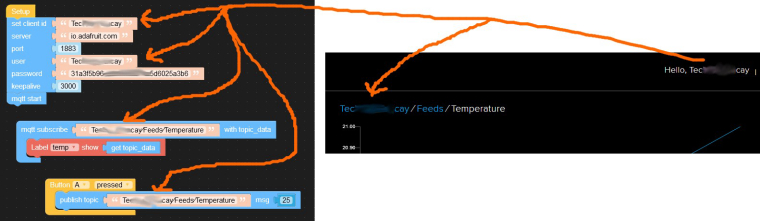
                  I also have problems with Adafruit. I can't send temprature to my feed Temperature.
                  What is the difference between "set client ID" and "User" in UIFlow mqtt block ?
                  I join mt screeshot, maybe someone can tell me where is my mistake.
                  Thanks.
                  0_1554560696951_adafrui2t.jpg

                  f3rn4nd0dF 1 Reply Last reply Reply Quote 0
                  • f3rn4nd0dF Offline
                    f3rn4nd0d @Techno86
                    last edited by

                    @techno86 set Client ID is just a name for the client you are setting up. You can name it "client" (remove the quotes) if you want. User is your ID in Adafruit. Hope it is clear.

                    1 Reply Last reply Reply Quote 0
                    • T Offline
                      Techno86
                      last edited by

                      I made it working, i used "Client" in ClientID but there was also a problem of "/" in feed path.
                      I found issue in Python code.
                      Thank you for help.

                      1 Reply Last reply Reply Quote 0
                      • world101W Offline
                        world101
                        last edited by

                        In your picture, the “/“ looks strange (it is touching the text) and not like mine. Perhaps you copied and pasted the feeds path from the Adafruit dashboard into UIFlow and it added some other character that looks like “/“ but is not truly a forward slash. Not entirely sure, but glad you got it working.


                        1 Reply Last reply Reply Quote 0

                        Hello! It looks like you're interested in this conversation, but you don't have an account yet.

                        Getting fed up of having to scroll through the same posts each visit? When you register for an account, you'll always come back to exactly where you were before, and choose to be notified of new replies (either via email, or push notification). You'll also be able to save bookmarks and upvote posts to show your appreciation to other community members.

                        With your input, this post could be even better 💗

                        Register Login
                        • First post
                          Last post