Wifi settings tutorial
-
UIFlow, core2, does anyone have a tutorial, or screneshot, of what all is involved in allowing a user to change wifi ssid/password WITHOUT burning?
-
The easyiest way is to use the CardKB unit:
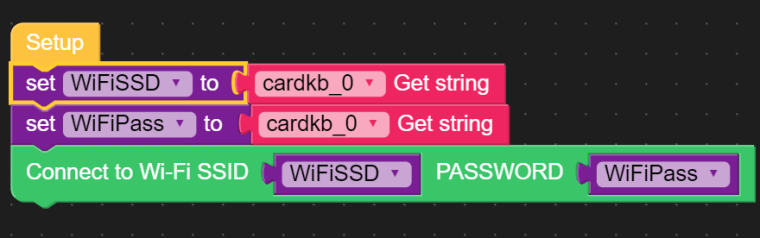
On the other hand you could use the simple touch keyboard:
https://community.m5stack.com/topic/2324/simple-touch-keyboard -
@crami25 said in Wifi settings tutorial:
CardKB unit
I should add I'm looking to do this without additional hardware
-
Using buttons and labels you can draw a screen table and use it as an on screen keyboard in order to enter the SSID and Password ..
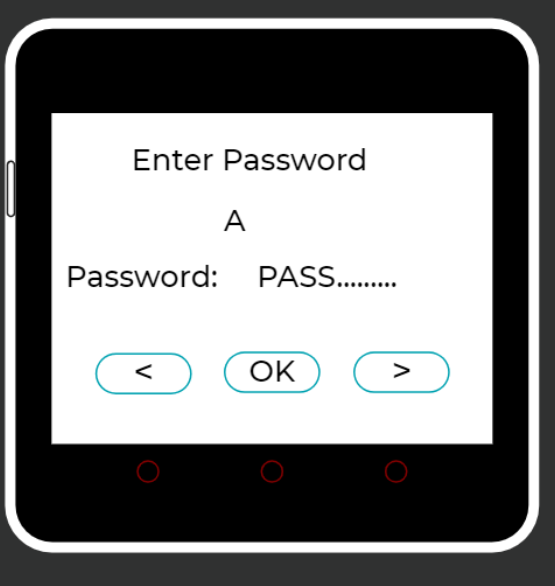
Pressing < > you scroll through the alphabet, with OK you confirm the letter... Much like setting and confirming your wifi credentials on an android TV
When finished you connect to the Wi-Fi with the SSID and Password.
Hello! It looks like you're interested in this conversation, but you don't have an account yet.
Getting fed up of having to scroll through the same posts each visit? When you register for an account, you'll always come back to exactly where you were before, and choose to be notified of new replies (either via email, or push notification). You'll also be able to save bookmarks and upvote posts to show your appreciation to other community members.
With your input, this post could be even better 💗
Register Login