Accessing decoded JSON array
-
Hello,
I am new to using UIFlow, but not to programming.
I am using UIFlow on my M5Stack project.
I am having difficuly in accessing a JSON decoded array.
Within the Python code I have a snippet of code:-Decoded_Packet = json.loads(Packet) Decoded_Location = Decoded_Packet["location"]Which works in my application, but it won't change to the UIFlow - Blockly representation, nor save and load correctly.
So my question in Blockly what is the equivalent of:-
Decoded_Location = Decoded_Packet["location"]
or
Decoded_OutTemp = Decoded_Packet["stats]["current"]["outTemp"]Which work in the Python coding.
Regards
Phil. -
You should be able to use the "get key in map" block from "map"
https://docs.m5stack.com/#/en/uiflow/data_structure?id=mapGet key location from map Decoded_Packet
-
@sodoku
Hello,
Yes your answer is correct, I have just found the answer just before you replied!!
See attached screenshot.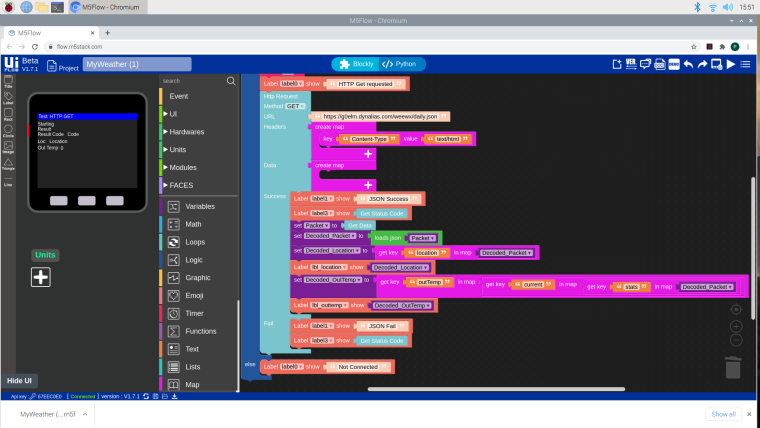
Many thanks for the advice.
Regards
Phil -
@philg1300
Thanks Phil, this was very helpfull for me too. -
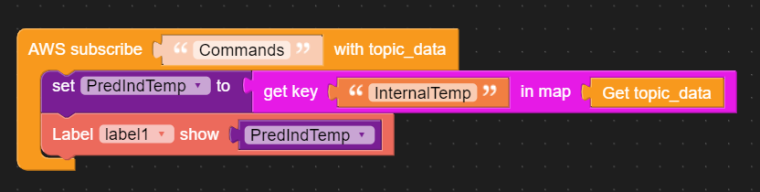
@kombistack Im trying to do something similar to this. I'm subscribing to an AWS IOT topic which is publishing a JSON. I can receive the whole message but in trying to extract one field from the JSON its not returning anything. Pic below
-
@rmorgan please dont double post.


Hello! It looks like you're interested in this conversation, but you don't have an account yet.
Getting fed up of having to scroll through the same posts each visit? When you register for an account, you'll always come back to exactly where you were before, and choose to be notified of new replies (either via email, or push notification). You'll also be able to save bookmarks and upvote posts to show your appreciation to other community members.
With your input, this post could be even better 💗
Register Login